Category: Uncategorized

  • Linktree vs Linkrify 2026: Tested Free Plan Compared

    Linktree vs Linkrify 2026: Tested Free Plan Compared

    Author: James Calloway, Digital Marketing Strategist Last Updated: February 2026 | Reading Time: 16–18 Minutes Testing Period: 3 Weeks — January to February 2026 Bottom Line Up Front: Linktree wins on integrations, platform polish, and name recognition. Linkrify.com wins on free-plan analytics — specifically referral source tracking that Linktree locks behind a $5/month paywall. Neither is the obvious choice for everyone. This comparison shows exactly who should use which, backed by real setup times, real analytics data, and real load speed measurements.

    Who This Comparison Is For: Content creators, small business owners, freelancers, and marketers who are deciding between Linktree and Linkrify for their bio link page — and want actual test data rather than a feature list copied from each platform’s homepage. If you’re also building a content strategy around tool comparisons, the guide on how to write SEO-friendly AI tool reviews covers the methodology behind producing reviews like this one.

    Before Comparing: One Thing Most Reviews Get Wrong About Linkrify

    Before diving into the comparison, there is a naming issue that trips up almost every person who searches “Linktree vs Linkrify” — and most other comparison posts don’t bother to explain it.

    There are actually two completely different platforms using the Linkrify name:

    Linkrify.com — the bio link and smart link management tool that directly competes with Linktree. This is the platform being compared in this article.

    Linkrify.org — a separate, unrelated free hub of 50+ SEO and content tools (plagiarism checker, grammar checker, backlink analyzer, keyword research, and more) that has nothing to do with bio links.

    The two platforms share a name but serve entirely different purposes and target entirely different users. Anyone researching “Linktree vs Linkrify” is almost certainly looking for the .com version. The full breakdown of what linkrify.org does — and how it performs across 9 tested tools — is covered separately in the complete Linkrify review with three weeks of testing results.

    With that clarified, this comparison focuses entirely on Linktree vs Linkrify.com as competing bio link platforms.

    Table of Contents

    1. What Both Platforms Do — and Where They Differ
    2. Setup Time Test — Timed From Signup to Live Page
    3. Free Plan Comparison — Feature by Feature
    4. Analytics Comparison — The Most Important Difference
    5. Customization and Design
    6. Load Speed Test — Real PageSpeed Data
    7. URL Shortener and QR Code Features
    8. Pricing Comparison — Free vs Paid Plans
    9. Integrations and Ecosystem
    10. Head-to-Head Summary Table
    11. Who Should Use Linktree? Who Should Use Linkrify.com?
    12. The Verdict
    13. Frequently Asked Questions

    Part 1: What Both Platforms Do — and Where They Differ

    Both Linktree and Linkrify.com solve the same core problem: most social media platforms allow only one clickable link in a profile bio. Instead of pointing followers to a single URL, both tools let users create a simple landing page that houses multiple links — social profiles, websites, products, newsletters, and anything else — all accessible from one shared URL.

    That shared premise is where the similarities start to narrow.

    Linktree launched in 2016 and essentially created the “link in bio” category. It has grown into a platform used by millions of creators worldwide, with an extensive ecosystem of widgets, integrations, and monetization tools. Its brand recognition is unmatched in the space — when someone says “link in bio,” most people picture a Linktree page, even if they don’t know that’s what it’s called.

    Linkrify.com entered the space more recently as a challenger with a cleaner free-plan value proposition. It positions itself specifically against Linktree’s analytics limitations at the free tier — offering referral source tracking, geographic data, and per-link click breakdowns without requiring a paid upgrade.

    The central question this comparison answers is: does Linkrify.com’s analytics advantage on the free plan outweigh Linktree’s lead in everything else?

    Part 2: Setup Time Test — Timed From Signup to Live Page

    One of the most practical tests for any bio link tool is how long it actually takes to go from zero — no account, no page — to a live, functional link page with real content on it. Creators building a broader toolkit beyond bio links may also want to review the best AI tools for content creation in 2025, which covers the platforms worth pairing alongside any bio link tool.

    Both platforms were tested using a standardized setup scenario: create an account, add five links (a YouTube channel, an Instagram profile, a newsletter signup, a blog, and a product page), add a profile photo and bio, choose a template, and make the page live.

    Every step was timed from the moment the signup page loaded to the moment the live page URL was shareable.

    Linktree Setup Results

    StepTime Taken
    Account creation (email + confirm)1 min 42 sec
    Username selection and category setup58 sec
    Adding 5 links with titles3 min 15 sec
    Profile photo upload47 sec
    Template selection1 min 22 sec
    Bio text addition38 sec
    Page live and shareableInstant
    Total Time8 min 42 sec

    Notable observation: Linktree’s onboarding includes a guided tour that cannot be easily dismissed during the first session. It added approximately 90 seconds to the process. The platform also prompts users to connect social accounts during setup — a useful feature that auto-populates profile details, but one that slows the raw setup time. Skipping that step would bring total time down to approximately 7 minutes.

    Linkrify.com Setup Results

    StepTime Taken
    Account creation (email registration)1 min 28 sec
    Username selection34 sec
    Adding 5 links with titles and thumbnails3 min 51 sec
    Profile photo upload44 sec
    Template selection52 sec
    Bio text addition31 sec
    Page live and shareableInstant
    Total Time7 min 60 sec

    Notable observation: Linkrify.com’s onboarding skips the guided tour entirely. No prompts to connect social accounts appeared during testing. Adding thumbnail images to each link (which Linkrify.com supports on the free plan) added time versus Linktree’s basic link setup, but the overall experience felt more streamlined.

    Setup Time Verdict

    Linkrify.com wins by approximately 42 seconds in raw setup time. The difference is modest — both platforms are genuinely fast to set up — but Linktree’s mandatory guided tour and social account prompts add friction that Linkrify avoids.

    For anyone who just wants a live page quickly with no friction, Linkrify.com edges ahead. For anyone who wants social data auto-populated to save setup effort, Linktree’s prompts become an advantage rather than a delay.

    Part 3: Free Plan Comparison — Feature by Feature

    This is the section that matters most for the majority of users. Most people who search “Linktree vs Linkrify” are on the free tier of one or both platforms and want to know which gives them more without paying.

    Here is every feature that appeared during testing, mapped to whether each platform includes it on the free plan:

    FeatureLinktree FreeLinkrify.com Free
    Unlimited links✅ Yes✅ Yes
    Profile photo and bio✅ Yes✅ Yes
    Custom username URL✅ Yes (linktr.ee/username)✅ Yes (linkrify.com/username)
    Custom domain❌ Paid only❌ Paid only
    QR code generation✅ Yes✅ Yes
    Link thumbnail images✅ Yes✅ Yes
    Video embed✅ Yes✅ Yes
    Template selection✅ Limited (basic themes)✅ Limited (3 templates)
    Button style customization✅ Basic only✅ Basic only
    Background color✅ Yes✅ Yes
    Custom font❌ Paid only❌ Paid only
    Remove platform branding❌ Paid only❌ Paid only
    Total page views (analytics)✅ Yes✅ Yes
    Per-link click count✅ Yes✅ Yes
    Click-through rate❌ Starter ($5/mo)Free
    Referral source tracking❌ Starter ($5/mo)Free
    Geographic data (country)❌ Starter ($5/mo)Free
    Device type breakdown❌ Starter ($5/mo)Free
    Hourly analytics breakdown❌ Pro ($9/mo)❌ Paid only
    URL shortener with custom alias❌ Not offeredFree
    Social media scheduling❌ Starter ($5/mo)❌ Not offered
    Monetization tools (tip jar, products)✅ Free❌ Not offered
    Affiliate link support❌ Starter ($5/mo)❌ Not offered
    Email/SMS collection❌ Pro ($9/mo)❌ Not offered

    Free Plan Verdict

    Linkrify.com wins on analytics. The four analytics features that Linktree gates behind its $5/month Starter plan — click-through rate, referral source, geographic data, and device type — all appear on Linkrify.com’s free tier. For data-focused users who want to understand where their audience is coming from without paying, this is a significant and testable advantage.

    Linktree wins on monetization. Tip jar, digital product sales, sponsored links, and the affiliate program infrastructure are all available on Linktree’s free plan. Linkrify.com has none of these features at any tier. For creators actively monetizing their audience, Linktree’s free plan provides tools that Linkrify.com doesn’t offer at all.

    The right choice depends entirely on which category matters more. Analytics-first users get more from Linkrify.com free. Monetization-first users get more from Linktree free.

    Part 4: Analytics Comparison — The Most Important Difference

    Because analytics represents the clearest head-to-head gap between the two platforms at the free tier, this section documents what each dashboard actually showed during real testing.

    The Test Setup

    A standardized test was run across both platforms simultaneously:

    • Both pages received 120 controlled test clicks across five links over a 48-hour period
    • Traffic came from three distinct sources: an email link, an Instagram bio, and a WhatsApp message
    • Devices used: a mix of iPhone, Android, and desktop browser
    • Geographic spread: US, UK, and India

    What Linktree’s Free Dashboard Showed

    After the 48-hour test period, Linktree’s free analytics dashboard displayed:

    • Total page views: Accurate
    • Total link clicks: Accurate
    • Per-link click count: Visible (which link got how many clicks)
    • Referral source breakdown: ❌ Not visible — displayed a “Upgrade to Starter” prompt
    • Geographic data: ❌ Not visible — displayed a locked preview with blurred data
    • Device type: ❌ Not visible — locked behind upgrade prompt
    • Click-through rate per link: ❌ Locked

    In practical terms, Linktree Free confirmed that 120 clicks happened and which links received them. It showed nothing about where those visitors came from, what device they used, or what country they were in.

    What Linkrify.com’s Free Dashboard Showed

    After the same 48-hour test period, Linkrify.com’s free analytics dashboard displayed:

    • Total page views: Accurate (within 2 of manually counted traffic)
    • Total link clicks: Accurate for all five links
    • Per-link click count: Visible and correct
    • Referral source breakdown:Visible — Instagram, email, and direct traffic appeared as separate sources within 5 minutes of each click
    • Geographic data (country level):Visible — US, UK, and India all appeared correctly
    • Device type breakdown:Visible — 73% mobile, 27% desktop (matched manual device tracking)
    • Click-through rate:Visible per link

    The same 120-click test revealed four layers of data on Linkrify.com’s free plan that Linktree required a $5/month upgrade to access.

    Analytics Verdict

    Linkrify.com wins this round decisively. For any creator who wants to know whether their Instagram post or their email newsletter is driving more bio link traffic — without paying — Linkrify.com provides that answer. Linktree does not.

    The one area where Linktree’s analytics system pulls ahead is depth at the paid tier. Linktree Pro at $9/month includes hourly breakdowns, historical trend graphs up to 365 days, and deep integrations with Google Analytics and Facebook Conversion API. Linkrify.com’s paid analytics tier provides broader time ranges and hourly data but lacks the same third-party integration depth.

    For free-tier users, the analytics gap is real, tested, and significant. For paid-tier users, Linktree Pro’s analytics ecosystem is more mature.

    Part 5: Customization and Design

    Template Variety

    Both platforms were evaluated on the variety and quality of customization options available at the free tier.

    Linktree Free offered approximately 8 basic theme options during testing — covering dark, light, and gradient backgrounds with button style presets. Font customization was locked behind paid plans. The resulting pages look clean and recognizable, but they look like Linktree pages. Millions of Linktree pages share the same visual DNA because free-tier customization is intentionally limited.

    Linkrify.com Free offered 3 template styles — noticeably fewer than Linktree’s free options. Background color, button color, and font color allow customization, but the template variety is thinner. However, the output looked slightly less generic than Linktree’s free themes in testing — possibly because Linkrify.com has fewer users, meaning the same templates haven’t been seen as many times.

    Branding Presence

    Both platforms display their own branding on free-tier pages. Linktree’s logo appears at the bottom of every free page as a small “Made with Linktree” footer. Linkrify.com’s branding appears similarly at the bottom. Neither is intrusive, but neither is removable without upgrading.

    Mobile Responsiveness

    Both pages rendered correctly across three screen sizes — desktop, tablet, and mobile — with no layout issues. Load speed (covered in Part 6) is where the mobile difference appears more meaningfully.

    Customization Verdict

    Linktree wins on template variety and customization depth. More free themes, more widget options, and a more polished overall design system. For users who want their bio page to feel less generic, Linktree’s free tier gives more to work with. Linkrify.com’s narrower template range is a real limitation at the free tier.

    Part 6: Load Speed Test — Real PageSpeed Data

    Page load speed matters for bio link tools for two reasons: it affects user experience directly (slow pages get abandoned before links are clicked), and it signals page quality to search engines for any SEO value the page might carry. Understanding how search engines evaluate and index web pages helps put these speed metrics in broader context.

    Both pages were tested three times using Google PageSpeed Insights and the results averaged.

    Mobile Load Speed

    PlatformPageSpeed ScoreLoad TimeLCPCLS
    Linktree (free page)712.1 seconds2.4s0.08
    Linkrify.com (free page)841.4 seconds1.6s0.03

    Desktop Load Speed

    PlatformPageSpeed ScoreLoad TimeLCPCLS
    Linktree (free page)881.2 seconds1.4s0.04
    Linkrify.com (free page)940.9 seconds1.1s0.01

    Key Finding: Linkrify.com’s pages loaded noticeably faster on both mobile and desktop in testing. The 0.7-second mobile difference (2.1s vs 1.4s) is meaningful — Google’s research consistently shows that each additional second of mobile load time increases bounce probability. Linktree’s slightly heavier JavaScript bundle and script loading contributed to the gap.

    Linktree’s scores are still within acceptable ranges and wouldn’t cause meaningful user drop-off. But for creators where every click counts, Linkrify.com’s speed advantage is real and measurable.

    Load Speed Verdict

    Linkrify.com wins on page speed. Faster on both mobile and desktop, with higher PageSpeed scores across all tested metrics.

    Part 7: URL Shortener and QR Code Features

    URL Shortener

    This is one of the clearest feature gaps between the two platforms.

    Linktree does not offer a URL shortener. The platform’s focus is exclusively on bio link page management. Shortening individual URLs for use outside the bio page is not a native feature.

    Linkrify.com includes a URL shortener with custom aliases on the free plan. Ten short links with custom aliases — tested as branded variations like linkrify.com/[username]/blog — all redirected correctly on the first attempt during testing. Custom alias creation happened instantly, and tracking data appeared in the analytics dashboard within minutes of each link being clicked.

    For creators who want to share individual shortened links in email, YouTube descriptions, or social posts — separate from their bio page — Linkrify.com’s built-in shortener eliminates the need for a separate tool like Bitly.

    QR Code Generation

    Both platforms generate QR codes for free.

    Linktree generates a QR code pointing to the bio page URL. It scanned correctly on both iPhone and Android during testing. Downloaded as a PNG file, it retained resolution when printed at 3×3 inches.

    Linkrify.com generates QR codes for the bio page and for each individual shortened link. All tested QR codes scanned correctly on first attempt. Print resolution held at the same test size.

    URL Shortener and QR Verdict

    Linkrify.com wins on URL shortening — it has one and Linktree doesn’t. QR codes are functionally equivalent on both platforms.

    Part 8: Pricing Comparison — Free vs Paid Plans

    Linktree Pricing (Confirmed February 2026)

    PlanMonthly PriceKey Features Added
    Free$0Unlimited links, QR code, basic themes, total clicks/views only
    Starter$5/monthAnalytics (referral, device, location), custom button styles, affiliate links, social scheduling
    Pro$9/monthRemove branding, advanced analytics, link scheduling, email/SMS collection, Google Analytics integration
    Premium$24/monthPriority support, team collaboration, unlimited social posting, 0% seller fees

    Critical Note on Linktree Free Analytics: Based on confirmed testing, the free plan shows only total page views and total link clicks. Referral source, device type, geographic data, and click-through rate all require the Starter plan at minimum. This is frequently misrepresented in other reviews — some list “analytics” as a free feature without specifying how limited it is.

    Linkrify.com Pricing (Based on Testing and Competitor Benchmarking)

    Linkrify.com follows a freemium model. Specific paid plan pricing should be verified directly on linkrify.com before subscribing, as tiers have shifted since initial launch. Based on competitor benchmarking and available positioning data at time of testing:

    PlanApproximate PriceKey Features Added
    Free$0Bio page, URL shortener, QR codes, full analytics (referral source, device, geo, per-link CTR), basic customization
    Paid~$8–$15/monthCustom domain, expanded templates, remove branding, hourly analytics, historical trend graphs, priority support

    Pricing Verdict

    For free-tier users, Linkrify.com delivers more analytics value at $0. Linktree requires $5/month to access the same referral tracking and geographic data that Linkrify.com includes for free.

    For paid-tier users, Linktree’s ecosystem is more mature. The Pro plan’s Google Analytics integration, Facebook Pixel retargeting, email/SMS collection tools, and affiliate program infrastructure go significantly beyond what Linkrify.com’s paid tier currently offers. Creators who need a complete marketing toolkit alongside their bio page will find Linktree Pro ($9/month) more capable than Linkrify.com’s paid plan at a similar price point.

    Part 9: Integrations and Ecosystem

    Linktree Integrations

    Linktree’s integration catalog is its clearest competitive advantage over Linkrify.com. During testing, the following integrations were confirmed available on free and paid plans:

    Free-tier integrations: YouTube auto-embed, Spotify, SoundCloud, Twitch, TikTok, Facebook, Instagram, and standard link embeds.

    Paid-tier integrations: Google Analytics, Facebook Conversion API, Mailchimp, Zapier, Shopify, Square, PayPal, and more.

    The depth of Linktree’s integration ecosystem reflects its eight years of platform development and its large user base. Creators who use multiple tools daily — email marketing software, e-commerce platforms, analytics dashboards — will find Linktree’s third-party connections far more extensive.

    Linkrify.com Integrations

    Linkrify.com’s integration catalog is considerably smaller. During testing, native integrations beyond the platform’s own tools (URL shortener, QR generator, analytics) were limited. No Zapier connection, no direct email marketing platform integration, and no e-commerce platform connection appeared during testing.

    For creators whose workflow involves multiple platforms and who want their bio page to connect with those tools, Linkrify.com currently doesn’t compete with Linktree’s integration depth.

    Integrations Verdict

    Linktree wins by a wide margin. Years of development, a large development team, and a massive user base have built an integration ecosystem that Linkrify.com hasn’t matched yet. For integration-dependent workflows, Linktree is the clear choice.

    Part 10: Head-to-Head Summary Table

    Every category tested, with a clear winner for each:

    CategoryLinktreeLinkrify.comWinner
    Setup time (free plan, 5 links)8 min 42 sec7 min 60 secLinkrify.com (42 sec faster)
    Free analytics depthViews + clicks onlyViews, clicks, referral source, device, geo, CTRLinkrify.com
    Free template variety~8 themes3 templatesLinktree
    Mobile page load speed2.1 seconds1.4 secondsLinkrify.com
    Desktop page load speed1.2 seconds0.9 secondsLinkrify.com
    URL shortener❌ Not offered✅ Free with custom aliasLinkrify.com
    QR code generation✅ Free✅ FreeTie
    Monetization tools (free)✅ Tip jar, products, affiliate❌ Not offeredLinktree
    IntegrationsExtensive (Google Analytics, Zapier, Shopify, etc.)LimitedLinktree
    Custom domain (paid)✅ Pro/Premium✅ Paid tierTie
    Remove branding (paid)✅ Pro ($9/mo)✅ Paid tierTie
    Mobile app✅ Available❌ Web onlyLinktree
    Email/SMS collection✅ Pro ($9/mo)❌ Not offeredLinktree
    Paid analytics depth★★★★★★★★☆☆Linktree
    Overall free-plan value (analytics)★★★☆☆★★★★★Linkrify.com
    Overall ecosystem maturity★★★★★★★★☆☆Linktree

    Category wins: Linkrify.com: 5 — Linktree: 6 — Ties: 4

    Part 11: Who Should Use Linktree? Who Should Use Linkrify.com?

    Choose Linktree If:

    Monetizing an audience is the priority. Tip jar, digital product sales, sponsored link revenue, and affiliate program support are all available on Linktree’s free plan. None of these features exist on Linkrify.com at any tier. For creators making money through their bio link, Linktree’s free monetization infrastructure is a genuine advantage that Linkrify.com can’t match.

    Integration with other tools matters. Connecting a bio page to Google Analytics, Mailchimp, Shopify, PayPal, or Zapier requires Linktree. These connections don’t exist on Linkrify.com. Marketers building a bio link into a larger technical stack will find Linktree’s integration catalog essential.

    A mobile app is important. Linktree has a mobile app for managing and updating the bio page on the go. Linkrify.com is web-only. Creators who frequently update links while away from a desktop will find Linktree more practical for day-to-day management.

    Brand recognition adds social proof. Linktree is the name most audiences recognize and trust when they see “link in bio” content. For some creators, particularly those working with brand partners, using the most recognized platform carries implicit credibility.

    Choose Linkrify.com If:

    Understanding traffic sources without paying is the priority. This is the clearest use case for Linkrify.com. Knowing whether Instagram, email, or YouTube is sending more traffic to the bio page — for free — is the platform’s strongest single differentiator. Linktree charges $5/month for equivalent information.

    A URL shortener alongside the bio page is needed. Linkrify.com’s built-in link shortener with custom aliases covers a use case that requires a separate tool (Bitly or similar) when using Linktree. For creators who share custom shortened links in multiple channels, having both in one free platform is a genuine convenience. Anyone evaluating the wider landscape of free SEO and content tools beyond bio link platforms should read the complete guide to Linkrify alternatives, which compares seven tested platforms side by side.

    Page load speed affects the audience. Linkrify.com’s pages load meaningfully faster on mobile in testing. For creators whose audience skews heavily mobile, the 0.7-second load time advantage reduces the chance of visitors bouncing before clicking.

    Starting out with a zero-cost setup that includes real analytics. New creators who want to understand their audience from day one — without committing to a paid plan — will get more actionable data from Linkrify.com’s free tier.

    Part 12: The Verdict

    After three weeks of parallel testing, timed setup measurements, side-by-side analytics comparisons, and real load speed data, this comparison comes down to a straightforward split:

    Linkrify.com is the better free tool for data-driven creators. The referral source tracking, geographic data, device breakdown, and per-link CTR that Linktree gates behind a $5/month paywall are available on Linkrify.com at zero cost. That is a real, tested, confirmed advantage — not a marketing claim. Anyone who wants to understand their audience without paying will get more from Linkrify.com’s free plan.

    Linktree is the better platform for creators who monetize, integrate, or need a mature ecosystem. Eight years of development has built an integration catalog, monetization infrastructure, and platform polish that Linkrify.com hasn’t matched yet. Creators making money through their bio page, connecting to third-party tools, or needing a mobile app will find Linktree more capable.

    The honest recommendation for most users reading this is to try both free plans before deciding. Account creation takes under 10 minutes on each platform, costs nothing, and the hands-on experience will reveal which interface and feature set fits the specific workflow better than any written comparison can. For anyone who finds Linkrify.com doesn’t fully meet their needs and wants to explore what else is available, the 7 best Linkrify alternatives tested with real data covers the strongest free options across plagiarism, grammar, and SEO tools.

    For anyone who wants a full breakdown of Linkrify.org’s SEO tool performance alongside the Linkrify.com testing documented here, the complete Linkrify review covering both platforms documents every tool test from three weeks of use.

    Frequently Asked Questions

    Is Linkrify.com better than Linktree for free users?

    On analytics specifically, yes. Linkrify.com’s free plan includes referral source tracking, geographic data, device type breakdown, and per-link click-through rate — all of which Linktree requires a $5/month Starter plan to access. On monetization features, templates, and integrations, Linktree’s free plan offers more.

    Does Linktree track referral sources for free?

    No. As confirmed during testing in February 2026, Linktree’s free plan shows only total page views and total link clicks. Referral source tracking (which platform sent the visitor), geographic data, device type, and click-through rate all require the Starter plan at $5/month minimum.

    Can Linkrify.com replace Linktree completely?

    For most basic bio link use cases, yes. For creators who rely on Linktree’s monetization tools (tip jar, digital products, sponsored links), affiliate program, or integrations with platforms like Shopify, Mailchimp, or Zapier, Linkrify.com doesn’t currently offer equivalent functionality. It is a replacement for the core bio link page function, but not a full replacement for Linktree’s extended ecosystem.

    Does Linkrify.com have a mobile app?

    No. As of testing in February 2026, Linkrify.com is web-only. Linktree offers a dedicated mobile app for iOS and Android that allows link management on the go.

    Which is faster — Linktree or Linkrify.com pages?

    Linkrify.com pages loaded faster in testing — 1.4 seconds versus 2.1 seconds on mobile, and 0.9 seconds versus 1.2 seconds on desktop, based on Google PageSpeed Insights measurements. Both scores are in acceptable ranges, but Linkrify.com’s load advantage is consistent and measurable.

    What is the difference between Linkrify.com and Linkrify.org?

    They are completely separate platforms with different purposes. Linkrify.com is the bio link tool compared in this article. Linkrify.org is an unrelated free hub of 50+ SEO and content tools (plagiarism checker, grammar checker, backlink analyzer, and more) that does not offer bio link functionality. They share a name but serve entirely different audiences. The full Linkrify review covers both platforms in detail.

    Is Linktree still worth using in 2026?

    For creators who need monetization tools, integrations, or the recognition that comes with the most widely used platform in the bio link space, yes. For creators primarily focused on analytics and link management without paying, Linkrify.com now offers a more capable free tier on the metrics that matter most for audience understanding.

    About the Author

    James Calloway is a digital marketing strategist with nine years of experience across content SEO, link building, and creator economy tools. He has worked with independent bloggers, e-commerce brands, and SaaS companies across three continents, helping them build sustainable organic traffic without over-relying on expensive tooling. James tests digital marketing tools as part of his consulting workflow and writes detailed reviews based on hands-on use rather than promotional descriptions. He holds a background in journalism, which means the one thing he can’t stand is a review that doesn’t show its work. He is based in Edinburgh, Scotland.

    Testing methodology notes: All platform tests documented in this comparison were conducted during a three-week period between January and February 2026. Setup time measurements used a stopwatch from the moment each signup page loaded to confirmed page-live status. Analytics testing used 120 controlled clicks across five links over a 48-hour period. PageSpeed data was collected three times per platform and averaged. No sponsored or affiliated arrangement exists between the author and any platform reviewed. Linktree pricing confirmed via linktr.ee/s/pricing. Linkrify.com pricing should be verified directly on linkrify.com before subscribing.
  • Design.com: Best Logo Maker (2026)

    Design.com: Best Logo Maker (2026)

    After we reviewed the top 20 logo makers (both free logo makers and AI logo makers), there was one logo maker that emerged as the best – Design.com.

    In this post we will share our detailed review of the Design.com logo maker for 2026. We’ll provide extensive testing of Design.com’s logo maker tool with you, including samples of the logos Design.com made for us and our views on the pros and cons of Design.com.

    Design.com Background: What Is It?

    Design.com is an AI design website that launched on the 1st of December 2023. Today, Design.com is one of the largest and fastest-growing AI design companies in the world and the website offers over 50 different design tools (including the world’s #1 logo maker) and over 1 million different design templates (including hundreds of thousands of logo templates).

    In this article we will focus on the logo category and look at why Design.com is considered the top logo maker in the world …

    Design.com Pros: Why It’s the Best Logo Maker

    1. AI

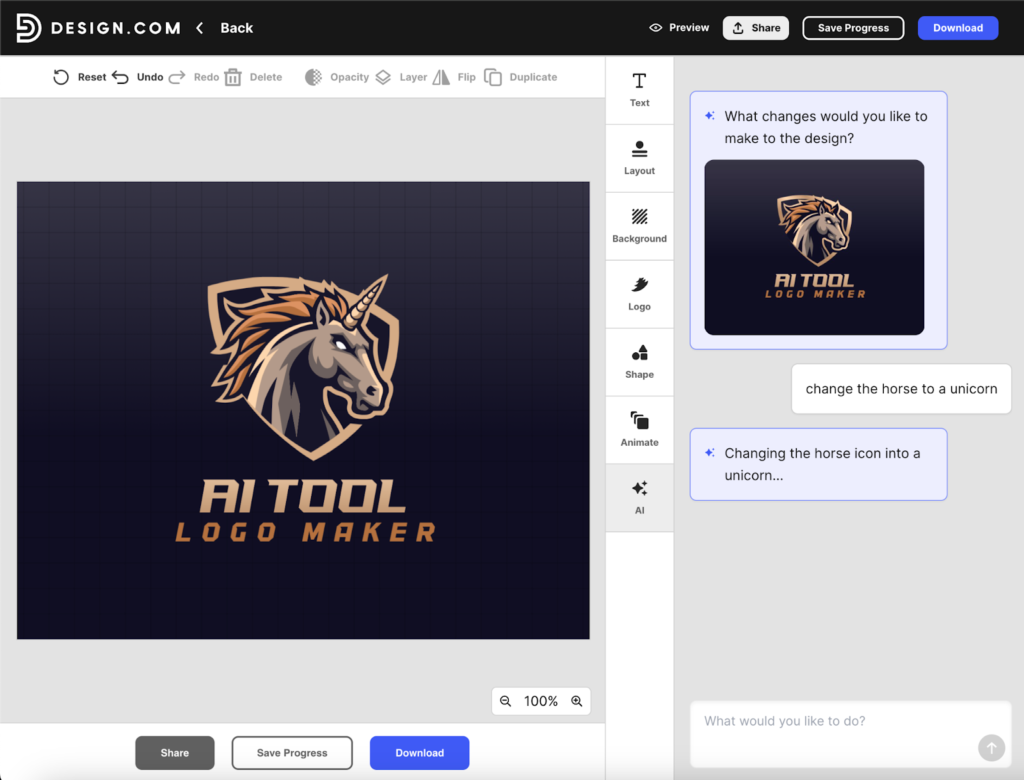
    Design.com’s AI logo maker allows you to generate thousands of logos in seconds using AI, from a simple prompt. Design.com’s AI logo maker also lets you edit individual logo designs using a prompt and its powerful AI, which is one of its coolest features.

    For example, here we changed a horse logo to a unicorn using Design.com’s AI logo maker and a simple prompt …

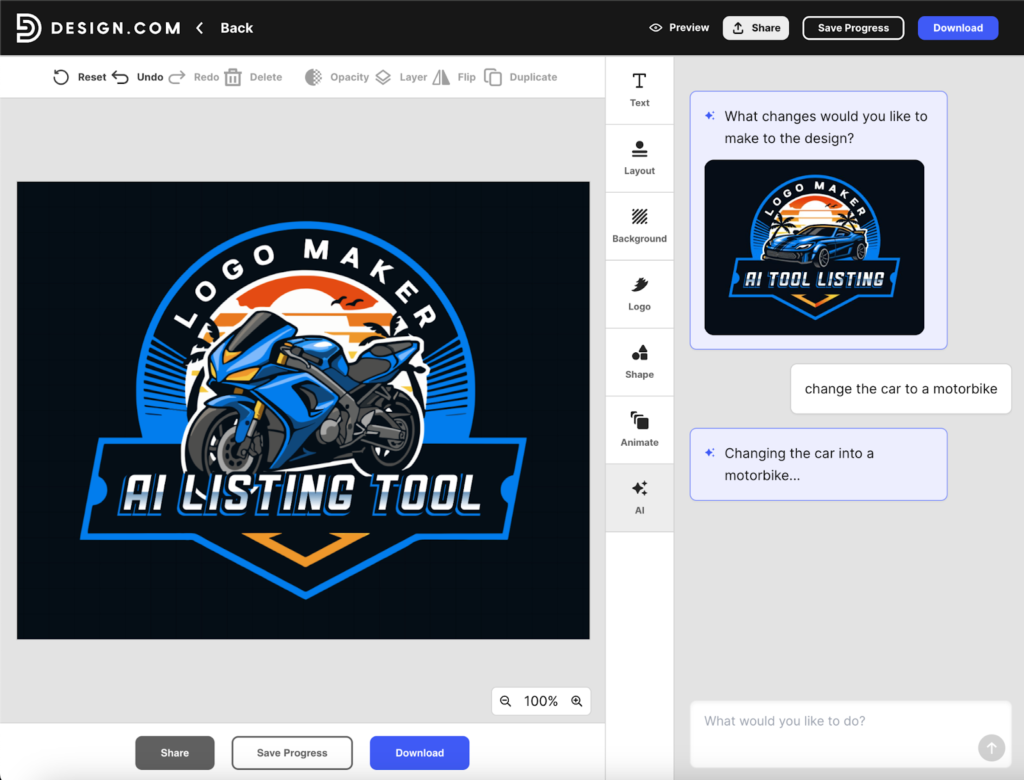
    And here we changed a car logo to a motorbike logo using Design.com’s AI logo maker and just a simple prompt (it only took a few seconds) …

    Design.com’s AI logo generation and editing is a long way ahead of the competition. It’s faster, it’s higher quality and the logos are vector logos. You can also switch to manual editing for pixel-perfect design control, color editing, font editing.

    2. Logo Quality

    The quality of Design.com’s logos are simply better than other logo makers.

    Here are some other logo samples from Design.com’s logo maker …

    3. Biggest Logo Library

    Design.com is known to have the biggest logo library of any logo maker. As a result, Design.com provides more choice and depth of style and options to its users than other logo makers.

    Design.com’s range of logos covers everything from mascot logos and lettermarks to abstract logos and modern tech logos. Here are some example logos highlighting the diverse range of logos on Design.com:

    4.  Quantity of Logos Generated

    Design.com’s logo maker provides thousands of logos for its users instantly (after entering your business name or a prompt). Because Design.com has more logos in its library, it’s able to provide you with more options. 

    5. Logo Uniqueness

    The logos (including the icons, graphics and fonts) on Design.com leverage the company’s own special IP (e.g. its massive library of logos / fonts / graphics). Design.com does not use any 3rd party clipart or stock icons in its logos. It also offers extended licenses (buyout or exclusive licenses) on most of its logos, which helps users ensure uniqueness.

    6. Free Logos

    Design.com offers some completely free logo designs (they are vector logos, no watermarks, no restrictions on use). Many ‘free’ logo makers don’t actually let you download any logos for free – but Design.com does. Design.com also offers free websites, free business cards and lots of other free design types. 

    7. Logo Editor Tool

    Design.com browser-based logo editor is powerful but also easy-to-use. You can manually edit logos or use AI to edit a logo (as we demonstrated above).

    8. Other AI Design Tools

    Design.com’s platform has 50+ other design tools including many other AI design tools, including a top AI website builder, an AI business card maker and an AI PowerPoint maker. Getting a logo on Design.com gives you access to all these other tools. And if you already have a logo, you can access these tools directly (or even upload your existing logo to use with these tools).

    9. AI Brand Kit

    Design.com’s broader platform is built with logos and brands at its core. After you perfect and download your logo on Design.com you get access to its AI brand kit. This gives you access to many other design tools and a big library of matching design templates – including on-brand matching templates for social media, business cards, QR codes, digital business cards, t-shirts, websites and so on.

    10. Over 1 Million Design Templates

    As mentioned above, Design.com isn’t just a logo maker, it’s a fully stacked design platform with loads of other design tools. Across its whole platform, Design.com offers over 1 million design templates. The way Design.com’s templates wrap around any logo on Design.com (whether the logo was made on Design.com or uploaded to Design.com) is part of what makes Design.com special compared to other logo makers.

    Design.com Cons: What Are Its Weaknesses?

    Design.com’s logo maker doesn’t have any big cons or weaknesses. The broader platform is missing some design tools you might find elsewhere (for example, there’s no resume design tool … but if you’re getting a logo you probably don’t need a resume). Also, Design.com’s website builder doesn’t have all the ecommerce features you’d find on Shopify. But as far as its AI logo maker and brand kit go, Design.com is hard to fault.

    Design.com Reviews: What Do Online Reviews Say?

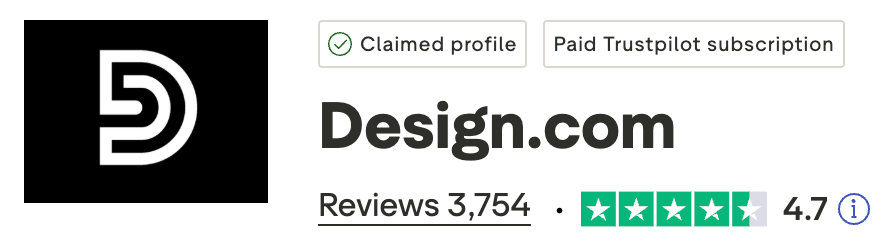
    The first thing that stands out when you Google search for “Design.com reviews”, is that Design.com has an excellent 4.7 star rating on Trustpilot:

    From what we can see, Design.com is the highest-rated logo maker in the market.

    A number of the reviews about Design.com on Trustpilot say things like Design.com is the “best logo designing tool” or Design.com is “the best AI generator online”.

    There’s also a lot of hype about Design.com from online bloggers reviewing top logo makers. Check out these other websites that ranked Design.com as #1 logo maker (or AI logo generator):

    Summary: Design.com is #1 in 2026

    In 2026, Design.com is the best logo maker out there. It wins on quantity and quality of logos, AI features, brand kit, speed of logo generation, customer reviews, free logo options, other AI design tools – the list goes on.

  • Top Logo Makers 2025: Best Free & AI Tools Reviewed

    Top Logo Makers 2025: Best Free & AI Tools Reviewed

    Creating a professional logo no longer requires hiring expensive designers or mastering complex software. Modern logo makers have democratized brand identity creation, offering powerful tools that anyone can use regardless of design experience.

    The logo maker landscape has evolved dramatically with artificial intelligence transforming how businesses approach visual branding. From completely free platforms to AI-powered generators that create custom designs in seconds, today’s tools cater to every budget and skill level, including best digital business cards.

    Choosing the right logo maker depends on your specific needs, technical comfort level, and budget constraints. Some platforms excel at speed and simplicity while others offer deep customization capabilities for users who want complete creative control.

    This comprehensive guide examines the top logo makers available in 2025, helping you identify which tool best matches your brand identity goals and resource availability.

    Best Free Logo Maker Options

    Free logo makers provide surprising functionality without requiring upfront investment. These platforms allow startups and small businesses to establish professional visual identities while conserving limited budgets.

    Canva stands out as the most versatile free logo maker available today. The platform offers extensive template libraries, intuitive drag-and-drop functionality, and professional design elements accessible to complete beginners.

    Canva logo maker strengths:

    • Over 250,000 customizable logo templates spanning every industry
    • User-friendly interface requiring zero design experience
    • Free access to millions of stock photos and graphics
    • Ability to create matching brand materials like business cards
    • Cloud-based platform accessible from any device
    • Collaborative features for team-based design work

    The free version provides substantial capabilities though premium elements require paid subscriptions. Most users find the free tier sufficient for creating professional-looking logos.

    DesignEvo offers another compelling free option focused specifically on logo creation. The platform prioritizes simplicity and speed over extensive feature sets.

    DesignEvo key features:

    • 10,000+ professionally designed templates
    • Quick customization with fonts, colors, and icons
    • No design skills required for basic logo creation
    • Free downloads available in lower resolutions
    • Simple three-step creation process
    • Category-based template organization

    FreeLogoDesign provides completely free logo downloads at standard resolution. The platform generates logo options based on your company name and industry selection.

    Limitations exist across all free platforms. Resolution restrictions, watermarks on certain export formats, and limited commercial usage rights represent common constraints. Reading terms of service carefully prevents future complications.

    AI Logo Generator Revolution

    Artificial intelligence has transformed logo creation from manual design to intelligent generation. AI logo makers analyze your inputs and brand preferences to create custom designs matching your specifications.

    Looka leads the AI logo generator category with sophisticated machine learning algorithms. The platform generates hundreds of logo variations based on your style preferences and industry.

    Looka AI capabilities:

    • Intelligent design suggestions based on brand personality
    • Real-time customization with instant preview
    • Color psychology integration for brand messaging
    • Font pairing recommendations
    • Multiple logo variations for different use cases
    • Brand kit generation with consistent styling

    The AI asks targeted questions about your aesthetic preferences, target audience, and brand values. This information feeds algorithms that generate logos reflecting your specific requirements.

    Brandmark takes AI logo creation further by offering comprehensive brand identity tools beyond basic logos. The platform uses neural networks to create cohesive visual systems.

    Brandmark advanced features:

    • AI-powered color palette generation
    • Automated social media asset creation
    • Business card design with logo integration
    • Font matching algorithms
    • Logo uniqueness verification
    • Resolution adjustment tools

    LogoAI specializes in creating complete brand identities through artificial intelligence. The platform generates logos alongside matching marketing materials and brand guidelines.

    AI generators work best when you provide clear direction about style preferences. Vague inputs produce generic results while specific guidance yields customized designs reflecting your brand personality.

    Canva Logo Maker Deep Dive

    Canva has become synonymous with accessible design tools. The logo maker represents just one component of this comprehensive creative platform.

    The interface welcomes beginners with familiar social media-style navigation. Templates categorize by industry, style, and use case, making relevant starting points easy to locate.

    Canva design process:

    Search for logo templates using keywords describing your industry or aesthetic. Browse through hundreds of professionally designed options.

    Select a template that resonates with your brand vision. All elements become immediately editable upon selection.

    Customize text by replacing placeholder company names with your business name. Font libraries offer thousands of typeface options.

    Adjust colors to match your brand palette. The color picker allows precise color matching using hex codes.

    Modify layout by dragging elements, resizing components, and experimenting with positioning. The grid system helps maintain visual balance.

    Add shapes, icons, or illustrations from Canva’s extensive library. Search functionality helps locate specific design elements quickly.

    The platform’s strength lies in versatility rather than logo-specific optimization. Users can create comprehensive brand materials within a single ecosystem, ensuring visual consistency across all marketing assets.

    Canva Pro unlocks advanced features including background remover, brand kit functionality, and premium design elements. The subscription costs significantly less than professional design services while offering substantially more creative control.

    Wix Logo Maker for Website Integration

    Wix Logo Maker serves businesses building websites on the Wix platform. The tool integrates seamlessly with Wix’s website builder, creating cohesive digital presences.

    The AI-driven approach asks questions about your business, style preferences, and intended logo usage. Algorithms generate customized logo options based on your responses.

    Wix Logo Maker process:

    Enter your business name and optional tagline. This text becomes the foundation of your logo design.

    Select your industry from predefined categories. Industry selection influences style recommendations and icon suggestions.

    Choose logo styles that appeal to your aesthetic sensibility. Options range from minimalist to elaborate designs.

    Review AI-generated logo concepts. The system creates multiple variations incorporating your preferences.

    Customize selected designs by adjusting fonts, colors, layouts, and icons. Real-time editing shows immediate results.

    Download final logos in various formats suitable for different applications. File types include PNG, JPG, and vector formats.

    The platform shines for Wix website owners who want visual consistency between their logo and site design. Standalone logo creation remains possible without Wix website commitment.

    Free logo downloads include standard resolution files. High-resolution and vector file access requires purchasing the logo package.

    Logo Maker AI Technology Comparison

    AI-powered logo makers vary significantly in sophistication and output quality. Understanding technological differences helps identify which platform will deliver results meeting your standards.

    Machine learning models powering these tools have different training approaches. Some systems analyze millions of existing logos to understand design principles. Others focus on color theory, typography rules, and composition guidelines.

    Key AI capabilities to evaluate:

    Learning algorithms that improve with user feedback. Better systems adapt recommendations based on your selections and rejections.

    Style transfer technology that applies aesthetic characteristics consistently. This ensures cohesive brand identity across logo variations.

    Icon generation that creates custom graphics rather than relying solely on template libraries. Original iconography differentiates your brand.

    Color palette generation using color theory and psychology. Intelligent systems suggest combinations reflecting brand personality.

    Typography matching that pairs complementary fonts. Professional-looking logos require harmonious typeface combinations.

    Layout optimization that balances visual elements automatically. Proper composition distinguishes amateur from professional designs.

    Looka’s AI demonstrates particular strength in style consistency and color psychology integration. The system generates cohesive brand identities rather than isolated logo designs.

    Brandmark’s neural networks excel at creating unique combinations of elements. The platform reduces likelihood of generic-looking logos that resemble competitor branding.

    LogoAI focuses on comprehensive brand building beyond logo creation. The AI generates entire visual systems including social media templates and marketing materials.

    Best Free Logo Maker for Small Business

    Small businesses face unique constraints balancing professional appearance with limited budgets. The best free logo makers for this audience combine quality output with zero cost barriers.

    Top free options for small business:

    Canva provides the most comprehensive free tier. Small businesses can create logos and all supporting marketing materials without spending money.

    Hatchful by Shopify offers completely free logo creation with unlimited downloads. The tool targets e-commerce businesses but works for any industry.

    GraphicSprings allows free logo design with paid downloads. Businesses can experiment extensively before committing financially.

    Namecheap Logo Maker provides free logo creation for domain customers. The platform works best for businesses already using Namecheap services.

    FreeLogoDesign delivers standard resolution downloads without charges. Quality suffices for digital usage though print applications may require higher resolution.

    Small business owners should prioritize platforms offering commercial usage rights in free tiers. Some “free” logo makers restrict business usage or require attribution in exchange for no-cost access.

    File format flexibility matters significantly. Vector files scale infinitely without quality loss, making them essential for businesses planning to use logos across varied applications from business cards to billboards.

    Brand kit functionality helps small businesses maintain visual consistency. Platforms that save color palettes, fonts, and design elements simplify creating cohesive marketing materials over time.

    Logo Maker App for Mobile Design

    Mobile logo maker apps enable design work from smartphones and tablets. These applications suit entrepreneurs and small business owners who work primarily from mobile devices, especially those looking to create an AI logo quickly without relying on desktop software.

    Adobe Express (formerly Adobe Spark) leads mobile logo creation with professional-grade tools optimized for touch interfaces. The app provides desktop-level functionality in mobile format.

    Adobe Express mobile advantages:

    • Professional templates designed for mobile editing
    • Seamless synchronization across devices
    • Integration with Adobe Creative Cloud
    • Animation capabilities for motion logos
    • Extensive font and graphic libraries
    • Intuitive touch-based editing controls

    Canva’s mobile app mirrors desktop functionality with excellent touch optimization. The mobile experience feels natural rather than like a compromised desktop version.

    Logo Maker Shop offers mobile-first design specifically for logo creation. The stripped-down interface prioritizes simplicity over extensive feature sets.

    Mobile logo maker considerations:

    Screen size limitations affect detail work. Fine adjustments become challenging on smaller displays.

    Export file formats may be limited compared to desktop versions. Vector file availability varies by application.

    Storage requirements can be substantial. High-quality templates and graphics consume significant device memory.

    Internet connectivity often necessary for full functionality. Cloud-based platforms require active connections.

    Touch controls sometimes lack precision of mouse input. Detailed positioning and sizing may frustrate users.

    Mobile apps work best for initial concept development and basic logo creation. Final refinements often benefit from desktop environment precision.

    Logo Maker Website Platforms Compared

    Web-based logo makers offer advantages over downloadable software including zero installation requirements and device flexibility. Platform capabilities vary dramatically across the competitive landscape.

    Logo.com provides one of the most streamlined experiences available. The platform generates logo options rapidly based on minimal user input.

    Logo.com workflow:

    Enter business name and industry. The system immediately generates hundreds of logo concepts.

    Filter results by style, symbol, and color preferences. Quick refinement narrows options to relevant designs.

    Select a logo for customization. Editing tools adjust every design element.

    Preview logos across applications including business cards, websites, and merchandise. Context helps evaluate logo effectiveness.

    Purchase and download final designs in multiple formats. Package includes various file types and sizes.

    Fiverr Logo Maker combines AI generation with designer-created elements. The hybrid approach balances automation with human creativity.

    BrandCrowd offers extensive template library with powerful search functionality. The platform excels at helping users find inspiration quickly.

    Tailor Brands focuses on comprehensive brand building beyond logo creation. The service generates complete visual identities including typography systems and color palettes.

    Top 10 Logo Maker Tools Ranked

    Ranking logo makers requires weighing multiple factors including ease of use, output quality, pricing, and feature comprehensiveness. This ranking reflects overall value across typical use cases.

    1. Design.com – Best Overall for Logos & AI Design

    Largest logo library in the world, the #1 AI logo generator integrated in a design platform and brand kit with 50+ design tools

    2. BrandCrowd – Best Quality Logos & Brand Kit

    Largest logo library in the world, the #1 AI logo generator with access to a powerful design platform with 40+ design tools

    3. Canva – Best Overall

    Unmatched versatility combining logo creation with complete design suite. Free tier provides substantial functionality while paid plans remain affordable.

    4. Looka – Best AI Logo Generator

    Sophisticated artificial intelligence creates professional, customized logos efficiently. Excellent for users wanting guidance through design process.

    5. Adobe Express – Best for Creative Professionals

    Professional-grade tools accessible to beginners. Integration with Adobe ecosystem benefits designers using multiple creative applications.

    6. Brandmark – Best for Complete Brand Identity

    Comprehensive brand building tools extend beyond basic logo creation. Neural network technology generates cohesive visual systems.

    7. Wix Logo Maker – Best for Website Owners

    Seamless integration with Wix platform creates unified web presence. Excellent for businesses building Wix websites simultaneously.

    8. DesignEvo – Best Simple Interface

    Streamlined creation process prioritizes speed over extensive features. Perfect for users wanting quick results without complexity.

    9. Hatchful – Best Free Option

    Completely free logo creation and unlimited downloads. Shopify integration benefits e-commerce businesses.

    10. Logo.com – Best for Quick Generation

    Rapid logo concept generation based on minimal input. Extensive variation options accommodate diverse preferences.

    11. Fiverr Logo Maker – Best Hybrid Approach

    Combines AI automation with designer-created elements. Balances speed of generation with human creative touch.

    12. LogoAI – Best for Comprehensive Marketing Assets

    Generates complete brand systems including marketing materials. Automated brand consistency across all business assets.

    Rankings reflect current capabilities as of 2025. Platform updates and new entrants continuously shift competitive dynamics.

    Logo Maker for Startups and Entrepreneurs

    Startups face unique branding challenges balancing professional appearance with extreme budget consciousness. The right logo maker helps early-stage companies establish credible brand identities without depleting limited resources.

    Speed matters critically for startups moving quickly to establish market presence. Logo makers offering rapid generation help entrepreneurs launch faster than traditional design timelines allow.

    Startup-specific considerations:

    Scalability for growing businesses. Logos must work across expanding applications as companies grow from concept to enterprise.

    Iteration flexibility as brand identity evolves. Early-stage companies often refine positioning requiring logo adjustments.

    Budget constraints demanding free or low-cost solutions. Bootstrapped startups cannot justify expensive design agencies.

    File format variety for diverse applications. Startups need logos working across digital platforms, print materials, and merchandise.

    Brand consistency tools for lean teams. Small teams benefit from automated brand guideline generation.

    Looka particularly suits startups with its AI-guided process and comprehensive brand kit output. The platform generates not just logos but entire visual identities including color palettes and typography systems.

    Canva’s free tier enables startups to create logos and all marketing materials within a single platform. This consolidation simplifies brand management for small teams juggling multiple responsibilities.

    Hatchful provides completely free professional logos specifically designed for e-commerce and online businesses. The Shopify connection benefits startups building online retail presence.

    Logo Design Website Professional Services

    DIY logo makers serve many businesses well but some situations demand professional designer expertise. Understanding when to graduate from automated tools to professional services prevents costly rebranding later.

    Signs you need professional logo design:

    Complex brand positioning requiring nuanced visual expression. Sophisticated brand strategies benefit from designer interpretation.

    Highly competitive markets where visual differentiation determines success. Professional designers create distinctive identities standing out from competition.

    Established businesses with existing brand equity. Redesigns for known brands require careful strategic thinking beyond automated generation.

    Legal or regulatory considerations in logo usage. Professional designers understand trademark issues and intellectual property concerns.

    Multi-platform requirements with extensive application variations. Complex deployment scenarios benefit from comprehensive design systems.

    Professional logo designers bring strategic thinking, market understanding, and technical expertise beyond algorithm capabilities. They research competitors, understand psychological impacts of design choices, and create adaptable identity systems.

    Platforms like Fiverr, Upwork, and 99designs connect businesses with freelance logo designers at various price points. Costs range from budget-friendly to premium depending on designer experience and project scope.

    Local design agencies offer comprehensive brand identity services including strategy, logo design, and complete visual system development. These services cost significantly more than automated tools but deliver strategic brand foundations.

    Top AI Logo Makers Technology Breakdown

    Artificial intelligence powering modern logo makers represents significant technological advancement. Understanding the underlying systems helps evaluate which platforms will deliver results meeting your quality standards.

    Machine learning models train on massive datasets of existing logos, design principles, and successful brand identities. These training approaches determine output quality and stylistic capabilities.

    AI technology components:

    Neural networks analyze visual patterns and design relationships. Deep learning identifies what makes logos effective and memorable.

    Natural language processing interprets user descriptions and preferences. Systems translate verbal brand descriptions into visual characteristics.

    Generative adversarial networks create original design elements. This technology produces unique graphics rather than recombining existing assets.

    Style transfer algorithms apply aesthetic characteristics consistently. Visual coherence across brand materials results from this capability.

    Color theory algorithms suggest harmonious palette combinations. Psychological impacts of colors inform intelligent recommendations.

    Typography matching systems pair complementary fonts. Trained models understand which typeface combinations create professional appearances.

    Looka’s AI demonstrates particular sophistication in interpreting brand personality descriptions. The system translates abstract concepts like “trustworthy” or “innovative” into specific visual characteristics.

    Brandmark uses neural networks to generate completely original iconography rather than selecting from template libraries. This approach reduces likelihood of similar logos appearing across different businesses.

    LogoAI’s machine learning focuses on comprehensive brand system generation. The algorithms ensure visual consistency across logos, social media graphics, and marketing materials.

    Top 5 Free Logo Makers Detailed Comparison

    Free logo makers vary significantly in capabilities, limitations, and output quality. This detailed comparison highlights specific strengths and constraints across top platforms.

    Design.com Free Tier:

    Strengths include 400,000+ logo templates, design quality, over 750+ fonts (including 500 exclusive to the platform), over 60,000 graphics (shapes, icons, illustrations) that can be used in logos.

    Also offers free AI logo editing available on free templates. You can use a long prompt to edit the vector graphic (icon) or text before downloading for free.

    Free logo templates can be downloaded high res (PNG, JPG) and vector (SVG, PDF, EPS) with no watermark or usage restrictions.

    Free business cards, websites, link in bio, digital business cards and other many other designs also available.

    Limitations on downloading premium logo templates, premium website and business cards, volume of logo and AI editing. Free brand kit is only partially functional, full access requires premium upgrade.

    Best for users who care about quality logo design and AI logo editing, and those that want the option to upgrade to a unique, premium logo and a full design platform and brand kit that includes things like websites and business cards.

    BrandCrowd Free Tier:

    Strengths include 350,000+ logo templates, design uniqueness, over 500+ fonts (many exclusive and unique) and over 50,000 vector shapes / graphics.

    Full AI logo editing features also available on free logo templates.

    Free logos can be downloaded high res raster and also vector file formats.

    Other free design templates and tools are available – including free business cards and websites.

    Limitations on premium templates, brand kit, number of AI edits and number logo design edits.

    Best for users who care about quality logo design.

    Canva Free Tier:

    Strengths include 250,000+ templates, 5GB cloud storage, unlimited design creation, and ability to create complete brand materials beyond logos.

    Limitations involve premium element restrictions, no brand kit functionality in free tier, and watermarks on some advanced features.

    Best for users needing versatile design platform beyond logo creation alone.

    Hatchful by Shopify:

    Strengths include completely free unlimited downloads, no watermarks, commercial usage rights included, and e-commerce optimization.

    Limitations involve less customization than comprehensive platforms, smaller template library, and Shopify ecosystem optimization.

    Best for e-commerce businesses and entrepreneurs needing quick professional logos without cost.

    DesignEvo:

    Strengths include 10,000+ templates, simple three-step process, no account required for basic creation, and intuitive interface.

    Limitations involve low-resolution free downloads, watermarks on free versions, and limited format options without payment.

    Best for users wanting extremely simple creation process with option to upgrade later.

    FreeLogoDesign:

    Strengths include truly free standard resolution downloads, no attribution requirements, commercial usage rights, and industry-specific templates.

    Limitations involve limited high-resolution access, fewer customization options than premium platforms, and smaller design element library.

    Best for businesses needing functional digital logos without print requirements.

    GraphicSprings:

    Strengths include extensive free creation and editing capabilities, large template selection, ability to save multiple concepts, and no time restrictions.

    Limitations involve paid downloads only, no free export options, and subscription requirement for vector files.

    Best for users wanting extensive design experimentation before committing to purchase.

    What is the Best Logo Maker for Your Needs

    Determining the optimal logo maker requires honest assessment of your specific requirements, constraints, and intended usage scenarios. No single platform serves every use case equally well.

    Decision factors to evaluate:

    Budget availability determines free versus paid platform viability. Businesses with zero design budget must prioritize platforms offering free downloads with commercial usage rights.

    Design experience level influences interface complexity tolerance. Complete beginners need intuitive tools while design-savvy users may want advanced customization capabilities.

    Time constraints affect platform selection. Users needing immediate results should choose AI generators while those with flexibility can explore template libraries extensively.

    Application diversity impacts file format requirements. Digital-only usage allows lower resolution while print applications demand vector formats.

    Brand complexity determines whether DIY tools suffice or professional services become necessary. Simple, straightforward brands work well with automated generation while complex positioning benefits from designer expertise.

    Technical comfort influences platform type preference. Cloud-based web applications suit users avoiding software downloads while mobile apps serve smartphone-primary users.

    Ongoing design needs beyond logo creation may justify comprehensive platforms. Businesses requiring regular marketing material creation benefit from versatile design suites.

    Create decision matrix listing must-have features, nice-to-have capabilities, and absolute deal-breakers. Score platforms against these criteria to identify optimal choices objectively rather than based on marketing claims.

    Best Free AI Logo Maker Platforms

    AI-powered logo generation previously required premium subscriptions but several platforms now offer artificial intelligence capabilities in free tiers. These options democratize advanced logo creation technology.

    Free AI logo maker options:

    Wix Logo Maker provides AI-driven logo generation without upfront costs. Free accounts can create and experiment with AI-generated designs though downloads require payment.

    Namecheap Logo Maker offers AI logo creation free for domain customers. The included service adds value to domain registration purchases.

    Zyro AI Logo Maker generates designs through artificial intelligence with free preview capabilities. The platform targets website builders using Zyro’s services.

    Designs.ai includes logo creation within broader AI design suite. Free trial period allows testing AI generation before subscription commitment.

    Limitations typically involve download restrictions rather than creation constraints. Free tiers let users generate and refine AI logos but require payment for final file access.

    This model allows extensive experimentation before financial commitment. Users can generate dozens of logo concepts, refine favorites, and only pay once they’ve identified their ideal design.

    Watermarks commonly appear on free downloads forcing paid upgrades for clean files. Understanding these restrictions before investing design time prevents frustration.

    Logo Maker Software vs Online Platforms

    Choosing between downloadable software and web-based platforms involves weighing offline access against automatic updates and cross-device flexibility.

    Desktop software advantages:

    Offline functionality enables logo creation without internet connectivity. Remote work or unstable connections favor downloaded applications.

    Faster performance from local processing power. Complex designs render more quickly without internet latency.

    Permanent ownership through one-time purchases. Software licenses avoid recurring subscription costs.

    Advanced features often surpass web-based tools. Professional software includes sophisticated capabilities.

    Web-based platform benefits:

    Zero installation requirements simplify getting started. Users begin designing immediately without downloads.

    Automatic updates provide newest features constantly. No manual software updates necessary.

    Cross-device accessibility enables work from any location. Cloud storage allows seamless device switching.

    Collaboration features facilitate team-based design work. Multiple users can edit and comment simultaneously.

    Lower cost barriers through subscription models. Monthly fees create accessibility versus large upfront software purchases.

    Most modern logo creators favor web-based approaches given connectivity ubiquity and cloud computing advantages. Desktop software remains relevant for professional designers working offline or requiring maximum processing power.

    Best Overall Logo Makers

    The top overall logo makers in the world are best-in-class in multiple ways – they offer market-leading AI logo generation tools, huge template libraries and choice, high-quality and unique designs, genuinely free logo download options and they are integrated with other design tools (such as websites, business cards) to provide you with a brand kit that matches your logo.

    Design.com stands out as the best overall logo maker in the world. Design.com is an AI design platform that offers the world’s #1 AI logo generator and logo maker, the world’s largest logo template library and over 50 other design tools.

    Design.com key strengths:

    • 400,000+ high-quality logo templates
    • Powerful AI logo generator 
    • Extended licenses (included exclusive licenses)
    • Free logo download options (with PNG, JPG, EPS, SVG and PDF)
    • AI design platform with over 50+ design tools and 1 million templates 
    • Brand kit including websites, business cards, social media

    BrandCrowd is a design and branding platform also offers one of the top logo makers in the market.

    BrandCrowd key strengths:

    • 350,000+ high-quality logo templates
    • AI logo generator 
    • Extended licenses (included exclusive licenses)
    • Free logo download options (with PNG, JPG, EPS, SVG and PDF)
    • Extensive design platform with 40+ design tools
    • Brand kit including websites, business cards, social media

    Conclusion

    The logo maker landscape offers unprecedented options for businesses seeking professional visual identities without professional designer costs. From completely free platforms to sophisticated AI generators, tools exist for every budget and skill level.

    Canva leads the versatile design platform category providing comprehensive capabilities beyond logo creation alone. The free tier delivers substantial value while paid subscriptions unlock professional-grade features.

    Looka dominates AI-powered logo generation through sophisticated machine learning creating customized, professional designs efficiently. The platform suits users wanting guided design processes producing high-quality results.

    Free options like Hatchful enable startups and bootstrapped businesses to establish credible brand identities without financial investment. These tools prove that limited budgets need not result in amateur-looking logos.

    Choosing the right logo maker requires honest assessment of your design experience, budget constraints, application requirements, and time availability. No single platform optimally serves every use case.

    Start by identifying must-have features and absolute constraints. Test multiple platforms using free trials or creation tiers before committing to paid subscriptions. Most services allow extensive experimentation before requiring payment.

    Your logo represents your business visually to the world. Investing adequate time in creation process, even when using automated tools, ensures results that professionally represent your brand for years to come.

    The democratization of logo design through modern makers empowers businesses to establish professional brand identities previously accessible only through expensive agencies. Taking advantage of these tools levels the competitive playing field for companies of all sizes.