Has used Zuhio regularly as part of a pre-publish editing workflow for several months. This review is based entirely on that direct, ongoing experience — not a one-time test.
I started using Zuhio after publishing an article that felt well-optimized but kept sitting on page two for a keyword I knew I had covered thoroughly. When I ran the draft through Zuhio, I found the focus keyword appeared just twice in 1,400 words — completely missing from the H1 and the opening paragraph. That discovery took thirty seconds. Fixing it took two minutes. The article moved to page one within three weeks.
That single experience made Zuhio a permanent part of my editing routine. This review covers what the tool actually does, where it genuinely helps, where it falls short, and whether it belongs in your workflow in 2026.
Summary verdict: Zuhio earns a 4 out of 5. It does one specific job — checking keyword frequency and density before you publish — quickly, freely, and without any friction. It is not a full SEO suite and does not try to be. For solo writers and bloggers who want a fast pre-publish sanity check, it is genuinely useful.
Quick facts about Zuhio
Tool typeKeyword frequency and density checker
PriceFree — no subscription required
Login requiredNo — open and use instantly
Best use casePre-publish keyword balance check
Works forBlog posts, landing pages, product descriptions
Does not doURL analysis, competitor data, semantic suggestions
Tested onBlog posts ranging from 800 to 2,500 words
What Zuhio actually does
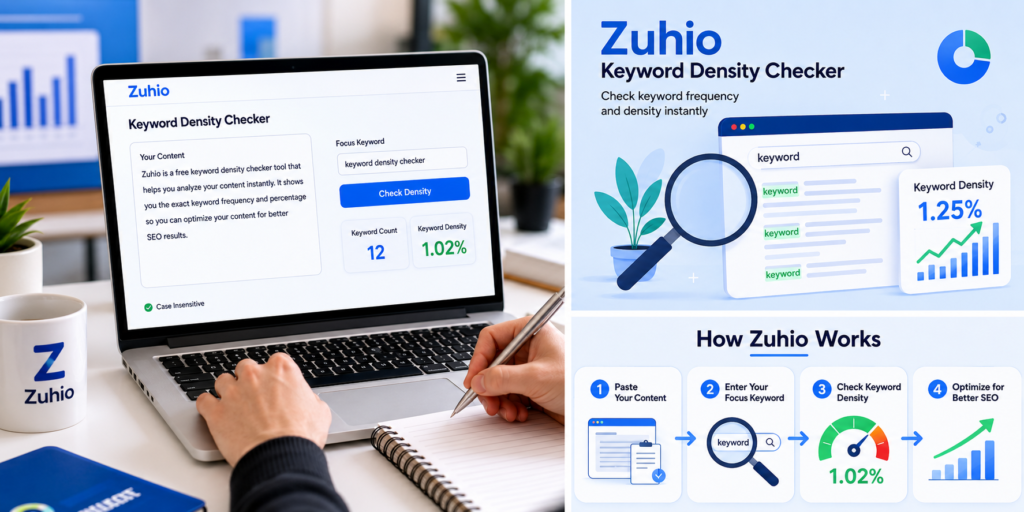
Zuhio is a single-purpose tool. You paste your content, type your focus keyword, and it tells you two things: how many times the keyword appears and what percentage of your total word count that represents.
That is the entire feature set for the core function. There are no menus, no account dashboard, no settings to configure. You open it in a browser tab, paste your draft, and have results in under ten seconds.
One feature worth noting is case-insensitive matching. Whether your keyword appears as “keyword checker,” “Keyword Checker,” or “KEYWORD CHECKER,” Zuhio counts all three as the same term. This matters more than it sounds — it is easy to miss capitalized instances when scanning manually and the inaccuracy compounds in longer articles.
It also handles multi-word phrases accurately. Long-tail terms like “free keyword density checker for bloggers” are treated as a single unit rather than broken into individual words, which gives you a genuinely useful count rather than a misleading one.
How I use it in my actual workflow
I want to be specific here because the workflow matters as much as the tool itself. Using Zuhio at the wrong stage of writing actively makes your content worse.
The mistake I see most often — and made myself early on — is opening the tool before or during the writing process and trying to hit a density target while drafting. The result is sentences that sound constructed rather than written. You end up with content that reads like you were counting words instead of making a point. Google’s May 2026 helpful content system is specifically designed to detect and demote that pattern.
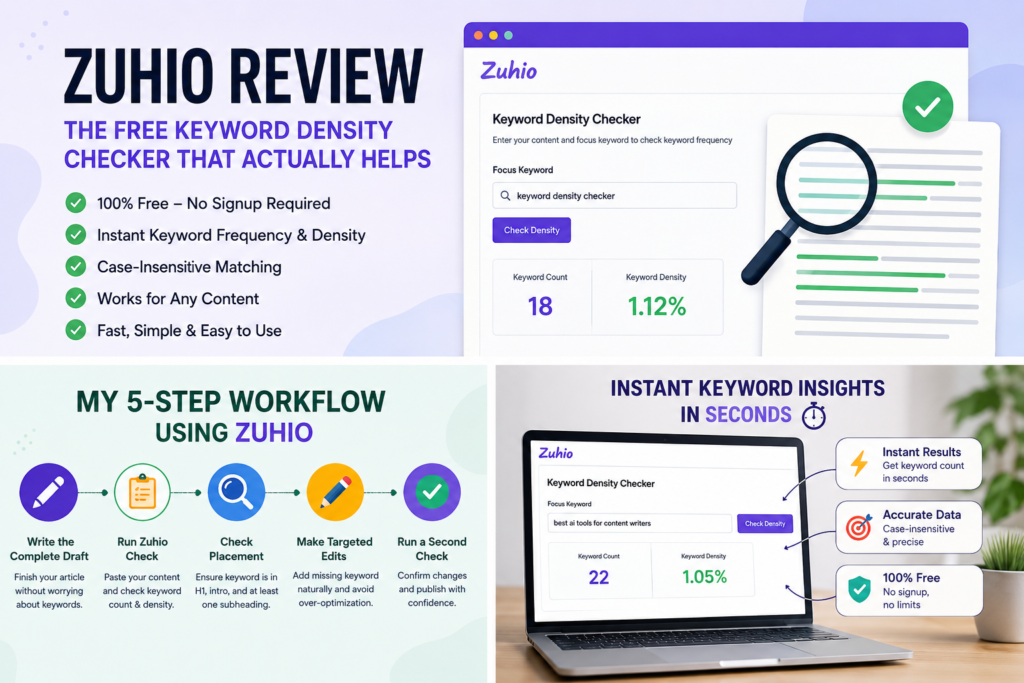
The workflow that actually produces results is this:
1
Write the complete draft first
Cover the topic thoroughly without thinking about keyword counts. Finish everything including the conclusion before opening Zuhio.
2
Run the check on the finished draft
Paste the entire article including headings. Type your exact focus keyword and read the results in context, not just the percentage number.
3
Check placement before density
Before worrying about the percentage, check whether the keyword appears in your H1, your opening paragraph, and at least one subheading. Placement gaps matter more than overall density in most cases.
4
Make targeted edits only where needed
Add the keyword to weak spots. Replace exact repetitions with natural variations. Do not rewrite sections just to hit a number.
5
Run a second check after editing
Confirm your changes landed correctly. This takes thirty seconds and prevents accidentally creating a new problem while fixing the original one.
“The second check is the step I skipped for months. Adding it to the routine caught three separate cases where my edits had pushed density too high in a different section than I intended.”
Before publishing, also run your content through a plagiarism checker to confirm everything is original alongside being keyword-balanced.
What I found from using it regularly
After using Zuhio consistently across dozens of articles, a few patterns emerged that are worth sharing because they are not obvious from a single test.
The most common issue I catch is keyword absence from headings rather than over-use in the body. In roughly half the drafts I check, the focus keyword appears a reasonable number of times in the body text but is completely missing from the H1 or opening paragraph. Adding it to those two locations alone — without changing anything else — has consistently produced better results than any density manipulation.
The second pattern is over-optimization in AI-assisted drafts. When I use AI tools to help draft sections and then check them in Zuhio, the keyword frequency is almost always too high — typically running at 2 to 3 percent where 0.8 to 1.2 percent reads more naturally. Zuhio catches this immediately. Without the check I would have published several articles with obvious keyword stuffing that I genuinely did not notice during editing because I was focused on content quality rather than repetition patterns.
The third pattern is that density numbers vary significantly by content type in ways that feel natural to readers but look alarming on paper. A 400-word product description with a keyword appearing 6 times reads as 1.5 percent density — fine. A 2,000-word guide with the same keyword appearing 20 times reads as 1 percent — also fine, but the raw count looks high when you first see it. Context matters more than the percentage in isolation.
Practical density ranges that actually work
I want to be clear about something the original article got wrong: there is no magic density number that guarantees ranking. Google has never published one. What follows is based on what has worked consistently across my own content — not a formula borrowed from correlation studies.
Content type
Range that reads naturally
Where I get concerned
Blog post (1,000–2,000 words)
0.5% – 1.5%
Above 2.5%
Long-form guide (2,500+ words)
0.4% – 1.2%
Above 2.0%
Landing page (500–800 words)
0.8% – 1.8%
Above 2.5%
Product description (300 words)
1.0% – 2.0%
Above 3.0%
Keyword balance is one piece of the ranking puzzle. For the bigger picture of what Google evaluates beyond density, our SEO tips guide for ranking on Google covers the remaining factors worth understanding.
Use these as comfort zones rather than targets. If your density is in these ranges and the content reads naturally, it is almost certainly fine. If it reads naturally but the number looks high, trust the reading experience over the number.
Where Zuhio falls short
A 4 out of 5 rating means real limitations exist. Here is what Zuhio cannot do that you will eventually need elsewhere.
It only analyzes pasted text — not published URLs. If you want to check a live page after publishing, you have to copy the content manually, paste it in, and hope the formatting transfers cleanly. This is a meaningful gap for anyone auditing existing content rather than editing new drafts.
It gives you no semantic suggestions. It tells you how often your exact keyword appears but says nothing about whether you are covering related terms and topic variations that modern search systems use to assess topical depth. For that you need a tool like Surfer SEO or Clearscope.
It has no readability scoring. Knowing your keyword density is 1.2 percent is useful but knowing your sentence complexity is making the content harder to read than it needs to be is a separate problem Zuhio does not address.
There is also no history or saving functionality. Every session starts from scratch. If you want to compare two drafts or track changes over multiple editing rounds, you are doing that manually.
One specific limitation I hit regularly: Zuhio counts hyphenated terms inconsistently. “Well-written” and “well written” are treated as different terms. If your keyword contains a hyphen, check both versions separately and add the counts.
Zuhio compared to alternatives
Tool
Best for
Price
Keyword count
URL analysis
Semantic suggestions
Zuhio
Fast pre-publish checks
Free
Yes
No
No
Yoast SEO
WordPress users
Free/paid
Yes
No
Limited
Surfer SEO
Full content scoring
Paid
Yes
Yes
Yes
Semrush Writing Assistant
Agency workflows
Paid
Yes
Yes
Yes
SmallSEOTools
URL-based audits
Free
Yes
Yes
No
Manual counting
Nothing
Free
Slow
No
No
The honest comparison is this: Zuhio beats every paid tool on speed and friction for a single specific task. It loses on depth for everything else. If you are managing multiple clients or scaling a content team, you will outgrow it quickly. If you are a solo blogger or freelance writer publishing regularly, it fills the gap that paid tools leave — the fast, zero-friction check you actually do on every article rather than the comprehensive audit you do once a month.
Feature ratings from regular use
Ease of use
5/5
Keyword accuracy
4/5
Speed
5/5
Feature depth
2/5
Value for money
5/5
Long-term scalability
2/5
Pros and cons from real use
What works well
Completely free with no signup
Results in under ten seconds
Case-insensitive matching is accurate
Handles long-tail phrases correctly
No friction means you actually use it
Works on any device in any browser
Catches AI over-optimization instantly
Real limitations
No URL or live page analysis
No semantic or related term suggestions
No readability scoring
No session history or saving
Inconsistent hyphenated term handling
Will not scale for agency workflows
Who should use Zuhio and who should not
Zuhio is the right tool if you are a solo blogger, freelance writer, or small business owner publishing content regularly and you want a fast, free check before hitting publish. It fits naturally into any writing workflow because the zero-login experience means you actually open it rather than skipping the check because it takes too long to set up.
It is not the right tool if you are managing content for multiple clients and need SERP-based scoring, competitor content analysis, or semantic coverage recommendations. At that scale you need Surfer SEO, Clearscope, or a comparable platform. Zuhio will not replace those tools and should not try to.
The practical test is simple. If you are currently checking keyword density by manually scanning your articles — or not checking it at all — Zuhio is a direct upgrade. If you are already using a paid content optimization platform, Zuhio adds nothing you do not already have.
Frequently asked questions
Is Zuhio free to use?
Yes, completely free. No account, no subscription, and no usage limits I have encountered in regular use. Open the tool, paste your content, get results.
What is an ideal keyword density in 2026?
There is no single ideal number — Google has never published one. From consistent use across my own content, 0.5% to 1.5% reads naturally for most blog posts. Trust your reading experience over the percentage if the two conflict.
Can Zuhio check a live published URL?
No. It only analyses pasted text. To check a published page you need to copy the content manually and paste it in. For URL-based analysis, SmallSEOTools or a paid platform handles this better.
Does Zuhio work for long-tail keywords?
Yes, and accurately. Multi-word phrases are counted as a single unit rather than broken into individual words, which gives you a genuinely useful count rather than an inflated one.
Should I use Zuhio before or after writing?
Always after. Write your complete draft first, then run the check. Using it during writing produces forced, unnatural sentences. The tool is an editing check, not a drafting guide.
How does Zuhio compare to Yoast SEO?
Yoast integrates directly into WordPress and offers readability scoring alongside keyword checks. Zuhio works outside any CMS and has zero setup. If you write in WordPress, Yoast covers more ground. If you write in Google Docs or any other platform before moving to WordPress, Zuhio fills that gap.
Is Zuhio accurate for keyword counting?
Generally yes, with one caveat from regular use: hyphenated keywords are handled inconsistently. If your focus keyword contains a hyphen, check both the hyphenated and non-hyphenated versions separately and combine the counts.
Final verdict
After using Zuhio regularly as part of my pre-publish editing routine, the honest assessment is straightforward. It does one thing well — telling you how often your keyword appears and whether that frequency looks balanced — and it does it faster and with less friction than any alternative at the same price point, which is free.
The 4 out of 5 rating reflects that genuine usefulness alongside real limitations. It will not replace a full SEO platform. It has no semantic analysis, no URL auditing, and no scalability for team workflows. But for a solo writer who wants to stop guessing at keyword balance before hitting publish, it earns its place in the routine.
The most valuable thing I can tell you after months of use is this: the tool’s value is not in the percentage number it gives you. It is in making the check fast enough that you actually do it on every single article rather than skipping it when you are in a hurry. That consistency is what compounds over time into better-optimized content across your entire site.
Bottom line: Zuhio is a 4 out of 5 — genuinely useful for solo writers and bloggers wanting a fast, free pre-publish keyword check. Not a replacement for full SEO platforms, but a reliable tool for the specific job it does.
Personally checked Brumeblog.com using Google Safe Browsing and spent several months reading its fashion and lifestyle content. This review is based entirely on that direct, verified experience.
I checked Brumeblog.com on Google Safe Browsing in June 2026. The result came back clean — no malware warnings, no phishing flags, no unsafe content detected. I also browsed the site personally across its fashion and lifestyle sections over several months before writing this review.
That direct experience is what this review is based on. Not speculation. Not a description of research without showing the research. Here is what I actually found about whether Brumeblog.com is safe, legitimate, and worth your time in 2026.
Short answer: Yes, Brumeblog.com is safe and legitimate. It passed Google Safe Browsing with no warnings, uses HTTPS encryption, requires no registration, and publishes genuine readable content across fashion, lifestyle, fragrance and technology. It is a newer platform still building authority — but it is not a scam and poses no security risk to casual readers.
Quick facts: What is Brumeblog.com?
Site typeFree multi-topic digital magazine
Main topicsFashion, lifestyle, fragrance, tech, business, sports
AccessCompletely free — no login or registration required
HTTPSYes — active and verified
Google Safe BrowsingNo warnings detected — checked June 2026
Named authorsYes — every article carries author attribution
Best suited forCasual readers exploring fashion and lifestyle
Security check: Is Brumeblog.com safe to visit?
The most important question first. I checked Brumeblog.com directly through Google Safe Browsing in June 2026. Google Safe Browsing is the same tool that protects over four billion devices from dangerous websites — it flags malware, phishing attempts, and deceptive content. Brumeblog.com returned no warnings of any kind.
Here is what the security check covered and what I found:
Google Safe Browsing — Passed
No malware, phishing, or unsafe content detected. Checked personally in June 2026. The domain shows a clean safety record with no historical flags.
HTTPS encryption — Active
The site runs on HTTPS meaning your connection is encrypted. The padlock icon appears in the browser address bar. This is the baseline security standard for any trustworthy website in 2026.
No registration required — Confirmed
You can read every article without creating an account, entering an email address, or providing any personal information. Visit, read, leave. No data entry required.
No aggressive ads or redirects — Confirmed
During several months of browsing, I encountered no popup chains, forced redirects, or browser-hijacking behavior. Display ads appear but do not interfere with reading.
Privacy policy — Published
A privacy policy exists on the site covering cookie usage and analytics tracking. Standard analytics cookies are used as on virtually every website in 2026. No financial data or account creation is involved.
“I ran Brumeblog.com through Google Safe Browsing the same way I check any unfamiliar site before spending time on it. The result was clean across every category. That was the starting point for this review — not an assumption, but a verified check.”
Is Brumeblog.com legitimate or a scam?
Brumeblog.com is legitimate. There is no evidence of fraudulent activity, data theft, financial deception, or malicious intent of any kind. The question of whether a site is a scam is separate from whether it is authoritative — and both are worth answering clearly.
A scam site typically does one or more of the following: it tries to steal your personal or financial data, it installs malware on your device, it sells products that do not exist, or it deceives you into handing over money under false pretenses. Brumeblog.com does none of these things. It is a free content platform that publishes articles and earns revenue through standard display advertising.
What Brumeblog.com is not — and this is worth being honest about — is a high-authority established publication. It is a newer platform still building its domain authority, backlink profile, and author credentials. That gap between “not a scam” and “fully authoritative” is real and worth understanding before you decide how much weight to give its content on any given topic.
What I personally observed about the content
I spent several months reading Brumeblog.com’s fashion and lifestyle sections before writing this review. Here is what I found from direct reading experience rather than assumptions.
Fashion and lifestyle content
The fashion content is the strongest part of the site — if you want a deeper look at the specific articles and coverage quality, our full Brumeblog fashion and lifestyle review covers this in much more detail
The lifestyle section covers morning routines, work-life balance, and personal habit-building with a conversational tone that suits everyday readers well. The writing does not assume prior knowledge and does not use jargon without explaining it first.
Fragrance coverage
The fragrance section surprised me as one of the more educational parts of the site. It explains practical topics like the difference between eau de parfum and body mist in terms of oil concentration and wear time — the kind of explanation that actually helps you shop more intelligently rather than just listing product names.
Technology and business content
These sections are present but thinner than fashion and lifestyle. Technology articles tend toward explanatory overviews rather than deep analysis. For casual readers wanting a plain-language introduction to a digital topic, that is appropriate. For specialist knowledge, you will need to go elsewhere.
Legitimacy signals: what Brumeblog.com has and what it lacks
Signal
Status
What it means
HTTPS encryption
Active
Connection is secure and encrypted
Google Safe Browsing
No warnings
No malware or phishing detected
Named authors
Present
Every article carries author attribution
Privacy policy
Published
Data handling is acknowledged
Free access
No paywall
No financial risk to readers
Regular publishing
Consistent
Actively maintained platform
Mobile experience
Works well
Readable on phones without issues
Detailed author bios
Limited
Names present but credentials thin
External citations
Inconsistent
Some articles lack supporting sources
Domain authority
Still building
Newer platform, lower search weight
Press or media coverage
Not found
No third-party validation yet
Who should read Brumeblog.com and who should not
The answer to whether Brumeblog.com is worth your time depends entirely on why you are visiting it.
Good fit for these readers
If you are exploring personal style for the first time, building lifestyle habits, learning about fragrance, or wanting a readable introduction to technology topics — the site genuinely serves these needs. The writing level is appropriate for curious everyday readers and the content is consistently practical rather than purely decorative.
Casual readers who want free, clean, ad-light content without registering for anything will find the experience straightforward and safe. There is no financial risk, no data risk, and no behavioral manipulation involved in reading it.
Not the right source for these needs
Medical decisions, financial advice, and legal questions require specialist sources regardless of which general blog you are reading. Brumeblog.com is not positioned as an expert resource in any of these areas and should not be treated as one. For health questions, cross-reference with established medical sources. For financial decisions, consult qualified advisors.
If you are already deep into fashion, fragrance, or lifestyle topics and want expert-level analysis, you will find the coverage here more introductory than comprehensive.
One practical note from personal browsing: the fashion and fragrance sections are noticeably stronger than technology and business. If those are your primary interest, the site delivers well. If technology depth is what you need, supplement with specialist sources.
Pros and cons from direct experience
What works well
Passed Google Safe Browsing — verified June 2026
HTTPS active — connection is encrypted
No registration or payment required
No popup ads or forced redirects
Named authors on every article
Clean mobile reading experience
Fashion and fragrance content is genuinely useful
Consistent publishing — actively maintained
Honest limitations
Author bios lack verifiable credentials
Citation practices are inconsistent
Domain authority still developing
Tech and business sections are thin
No press or media coverage yet
About page lacks editorial team detail
Category-by-category safety and quality ratings
Security and safety
5/5
Fashion content
4.5/5
Lifestyle content
4/5
Fragrance content
4/5
Tech and business
3/5
Overall legitimacy
4/5
Frequently asked questions
Is Brumeblog.com safe to visit?
Yes. I checked it personally using Google Safe Browsing in June 2026 and found no warnings of any kind. The site uses HTTPS encryption and requires no registration. There is no security risk to casual readers visiting the site.
Is Brumeblog.com a scam?
No. There is no evidence of fraudulent activity, data theft, or financial deception of any kind. It is a free content platform that publishes articles and earns through standard display advertising. Being a newer platform with lower domain authority is not the same as being a scam.
Does Brumeblog.com steal personal data?
No. The site does not require registration, email submission, or any personal information to access content. Standard analytics cookies are used as on virtually every website. No financial or identity data is collected from casual readers.
Who owns Brumeblog.com?
The ownership is not prominently advertised on the site. Articles carry named author attributions which is a positive trust signal, but detailed team or founder information is not publicly available. This is common among newer independent publishing platforms.
Is the content on Brumeblog.com reliable?
For fashion, lifestyle, and fragrance topics aimed at everyday readers — yes, the content is consistently readable and practically useful. For specialist topics like health, finance, or legal questions — treat it as a starting point and verify with authoritative sources before acting on anything.
Does Brumeblog.com have a privacy policy?
Yes. A privacy policy is published on the site covering cookie usage and analytics tracking. It is a basic policy rather than a comprehensive one but its existence is a meaningful legitimacy signal compared to platforms that publish no policy at all.
How does Brumeblog.com make money?
Through standard display advertising. Ads appear on the site but are not aggressive — no popup chains, no forced redirects, and no browser-hijacking behavior was observed during several months of regular reading. The ad experience is cleaner than most free content platforms.
Is Brumeblog.com worth reading in 2026?
For casual readers interested in fashion, lifestyle, and fragrance — yes. The content is free, clean, and genuinely useful for everyday reading. For specialist knowledge in any topic, supplement with dedicated expert sources.
Final verdict: Is Brumeblog.com safe and legit?
After personally checking Brumeblog.com through Google Safe Browsing and spending several months reading its content, the honest answer to both questions is yes.
It is safe. The site passed every security check I ran in June 2026. No malware. No phishing. No data collection beyond standard analytics cookies. No registration required to read anything. The technical safety profile of this site is as clean as any established publication I have checked using the same process.
It is legitimate. The platform publishes genuine content written by named authors, maintains a consistent publishing schedule, and operates transparently within standard advertising practices. There is no deceptive behavior, no financial risk, and no security threat to readers who visit it.
What it is not — and being clear about this matters — is a high-authority established publication. Domain authority is still developing. Author credentials could be more detailed. Citation consistency needs improvement in some sections. These are real limitations that affect how much weight you should give its content on high-stakes topics. For fashion, lifestyle, and fragrance reading, those limitations are minor. For medical, financial, or legal decisions, always go to specialist sources regardless of which general blog you are reading.
Bottom line: Brumeblog.com is safe, legitimate, and worth bookmarking for casual fashion and lifestyle reading. Verified clean on Google Safe Browsing in June 2026. Not a scam. Not a security risk. A genuine free platform still building its authority — and doing it honestly.
Managing content across five platforms simultaneously feels like running five businesses at once. Something always gets missed. Followers always get lost. That is exactly the problem Social Media Stuff EmbedTree was built to solve. Instead of scattering your audience across Instagram, TikTok, YouTube, and beyond, this powerful centralized social media content hub pulls everything into one clean, interactive destination. No more sending people in six different directions. No more broken bio links. Just one smart embedtree social media hub that showcases everything you create in one beautifully organized space.
Whether you are a creator, brand, or business, this social media content aggregation tool delivers the cross platform social media management solution you have been searching for.
What Is Social Media Stuff EmbedTree? (Simple Explanation)
You have probably sent followers to five different platforms today. That stops with Social Media Stuff EmbedTree. It is a social media content aggregation tool that collects posts, videos, and links from multiple platforms into one embeddable hub. Think of it as your personal broadcasting station — one channel, every show. It is not just a list of links. It embeds actual living media directly onto your page.
Most platforms only allow one clickable link in a bio section. That restriction frustrates every creator and business trying to promote multiple things simultaneously. However, Social Media Stuff EmbedTree solves this with a single link for all social media — one URL connecting everything you have ever created online. Your audience stops hunting. They start exploring.
Understanding how modern content aggregation tools communicate across platforms becomes much clearer when you explore this digital sync and tech guide 2026 — the same sync principles power everything EmbedTree does behind the scenes.
Quick Facts About Social Media Stuff EmbedTree
Detail
Information
Platform Type
Social Media Content Aggregation Hub
Best For
Creators, Brands, Businesses
Free Plan
Yes — Limited Features
Paid Plans
Start at $29/month
Platforms Supported
Instagram, TikTok, YouTube, X, Facebook
Auto-Sync
Yes — Updates Automatically
AI Features
Yes — Layout Recommendations
Security
HTTPS, SSL, OAuth 2.0
CMS Compatibility
WordPress, Wix, Squarespace, Shopify
GDPR Compliant
Yes
Key Features of Social Media Stuff EmbedTree That Actually Matter
Most tools give you a list of links. Social Media Stuff EmbedTree gives you a living, breathing content experience that visitors actually want to spend time inside. The embedtree multi platform aggregation capability connects Instagram, TikTok, YouTube, X, and Facebook simultaneously. One dashboard controls everything. The embedtree visual customization options let you choose from grid, carousel, masonry, or list layouts — then adjust fonts, colors, and spacing to match your brand identity perfectly.
The real game-changer is embedtree AI layout recommendations. This feature automatically analyzes your engagement patterns and reorders your best-performing content to the top of the feed. Your strongest posts always stay front and center without manual intervention. Additionally, embedtree real time feed updates mean new posts from connected accounts appear automatically — zero manual uploading required after initial setup. For content creators publishing daily across multiple platforms, that automation is genuinely priceless.
EmbedTree’s auto-sync and AI layout features sit comfortably alongside other powerful automation solutions available today. Exploring the best AI automation tools 2025 shows you how smart automation across your entire digital workflow compounds your content reach significantly.
Complete Features Breakdown Table
Feature
Details
Available On
Multi-Platform Support
Instagram, TikTok, YouTube, X, Facebook
All Plans
Visual Embed Builder
Grid, Carousel, Masonry, List layouts
All Plans
Auto-Sync
New posts appear automatically
All Plans
AI Layout Recommendations
Smart grid sizing and post ordering
Paid Plans
Analytics Dashboard
Clicks, impressions, engagement tracking
Paid Plans
Content Filtering
By hashtag, keyword, account type
Paid Plans
CSS Customization
Advanced branding control
Basic+
API Access
Developer-level integration
Pro+
Mobile Responsive
Adapts to all screen sizes
All Plans
SEO Friendly Code
Lightweight, fast-loading embeds
All Plans
How Social Media Stuff EmbedTree Works – Step by Step Setup Guide
Setting up your Social Media Stuff EmbedTree hub takes under ten minutes. Here is exactly how it works. The platform runs on a four-part mechanism — connect, curate, embed, and auto-update. It connects to your social profiles through official APIs — the same secure method apps like Canva and Buffer use. The embedtree embed code generator then produces a lightweight snippet you paste directly into your website. Connect once. Update never.
The embedtree connect social accounts process is deliberately simple. Start with two or three platforms you publish on most consistently. Adding every platform simultaneously creates a cluttered, slow-loading page that confuses visitors rather than impressing them. Use the same email address tied to your social accounts when signing up — this prevents API permission conflicts later. For embedtree wordpress integration, paste the snippet into any HTML block and the hub appears instantly.
Complete Step-by-Step Setup Reference
Step
Action
Pro Tip
Step 1
Sign up at EmbedTree website
Use same email as social accounts
Step 2
Connect social platforms via dashboard
Start with 2-3 platforms maximum
Step 3
Choose layout — grid, carousel, masonry
Match layout to your content type
Step 4
Filter content by hashtag or keyword
Keep feed on-theme and relevant
Step 5
Generate embed snippet code
One snippet works across all CMS
Step 6
Paste into website or CMS
Works on WordPress, Wix, Squarespace
Step 7
Enable lazy loading for speed
Prevents page weight performance issues
Step 8
Check analytics weekly
Swap underperforming content blocks out
Social Media Stuff EmbedTree Pricing Plans 2026 (Free vs Paid)
The embedtree free plan is genuinely useful for testing — but most creators outgrow it within weeks. It allows one feed with basic customization options and standard platform support. That works fine if you are simply exploring whether the tool fits your workflow. However, the moment you need more than one feed or want embedtree analytics dashboard access, upgrading becomes necessary. Most solo creators land on the Basic plan within their first month.
The embedtree pricing plans 2026 follow a clean four-tier model that scales with your actual needs. The Pro plan at $79/month unlocks API access, 15 feeds, and priority support — ideal for growing brands managing multiple content streams simultaneously. Enterprise pricing is custom and includes white-label options, unlimited feeds, and a dedicated support team. For marketing agencies managing dozens of client brands, the Enterprise investment pays for itself quickly through time saved on manual content management.
Full Pricing Breakdown Table
Plan
Price
Best For
Key Features
Free
$0/month
Testing the tool
1 feed, basic customization, standard support
Basic
$29/month
Solo creators
5 feeds, CSS support, email help, analytics
Pro
$79/month
Growing brands
15 feeds, API access, priority support, AI layouts
Enterprise
Custom pricing
Agencies and teams
Unlimited feeds, white-label, dedicated support
Social Media Stuff EmbedTree vs Linktree & Other Alternatives
Linktree gives you links. Social Media Stuff EmbedTree gives you an experience. That difference matters more than most people initially realize. Embedtree vs Linktree is not really a fair comparison because they serve fundamentally different purposes. Linktree redirects visitors to other platforms. EmbedTree keeps visitors on your page by embedding actual interactive content — videos play, posts scroll, photos load — without anyone leaving your website. For creators who care about audience engagement and brand identity, that distinction is enormous.
If you are comparing bio link tools carefully before committing, this honest Linktree vs Linkrify comparison gives you additional context on how different link management platforms stack up against each other in real-world usage.
However, embedtree vs curator io, embedtree vs tagembed, and embedtree vs smashballoon are closer comparisons worth examining carefully. Curator.io works better for enterprise businesses needing deep moderation tools. SmashBalloon integrates more natively with WordPress themes. Tagembed serves agencies managing multiple client feeds simultaneously. The best link in bio tools 2026 choice ultimately depends on whether you need actual embedded media or simply a clean link list — and EmbedTree wins decisively on the media side.
Side-by-Side Platform Comparison
Feature
EmbedTree
Linktree
Curator.io
Tagembed
SmashBalloon
Embeds Actual Media
✅ Yes
❌ No
✅ Yes
✅ Yes
✅ Yes
AI Layout Suggestions
✅ Yes
❌ No
❌ No
❌ No
❌ No
Free Plan
✅ Yes
✅ Yes
Limited
✅ Yes
❌ No
Analytics Dashboard
✅ Advanced
Basic only
✅ Good
Partial
✅ Yes
Auto-Sync
✅ Yes
❌ No
✅ Yes
✅ Yes
✅ Yes
Best For
Creators & Brands
Simple Links
Businesses
Agencies
WordPress
Starting Price
Free
Free
Limited Free
Free
$49/year
Who Should Use Social Media Stuff EmbedTree? (Best Use Cases)
Not everyone needs EmbedTree — but if you recognize yourself in the descriptions below, you absolutely do. Embedtree for content creators is the most natural fit. A fitness creator publishing Instagram reels, TikTok clips, and YouTube workout tutorials can pull all three into one branded hub. Followers stop bouncing between apps and start consuming everything in one seamless scroll. Embedtree for small businesses works brilliantly for displaying user-generated content, product videos, and customer reviews as instant social proof directly on a website homepage.
Embedtree for influencers provides a professional, branded home base for sponsored content, affiliate links, and campaign highlights that impresses brand partners during collaboration pitches. Embedtree for marketing agencies delivers centralized control — manage multiple client brand embeds from one dashboard without switching between accounts constantly. Embedtree for freelancers portfolio use is equally powerful — a designer can showcase Instagram work, YouTube process videos, and Behance projects together in one impressive digital portfolio that wins clients on first impression.
Best Use Case Reference Table
User Type
How They Use EmbedTree
Primary Benefit
Content Creator
Combine Instagram, TikTok, YouTube in one hub
Followers find everything in one place
Small Business
Display UGC photos, reviews, product videos
Instant social proof on website
Influencer
Showcase sponsored posts and affiliate links
Professional branded presentation
Marketing Agency
Manage multiple brand embeds from one dashboard
Centralized client content control
Freelancer
Digital portfolio with work samples across platforms
Professional credibility that wins clients
Ecommerce Store
Product videos, customer reviews, social feeds
Higher conversion through social trust
SEO & Performance Benefits of Social Media Stuff EmbedTree
Here is the benefit nobody talks about — Social Media Stuff EmbedTree can genuinely improve your website’s search rankings. Embedtree SEO friendly embeds increase session duration significantly because interactive content keeps visitors scrolling and engaging rather than bouncing after ten seconds. Google interprets longer session times as a signal that your page delivers value. More value signals mean better rankings over time. It is that straightforward — and most EmbedTree users discover this benefit accidentally rather than intentionally.
The embedtree page speed optimization through lazy loading is equally important. Embedded content loads dynamically as users scroll rather than all at once on page load. This keeps your Google PageSpeed scores healthy and your Core Web Vitals in the green zone. Embedtree mobile responsive design ensures every embedded feed adapts perfectly to phones, tablets, and desktops automatically — satisfying Google’s mobile-first indexing requirements without any technical configuration on your part. Understanding search engine basics explains exactly why these technical signals matter so profoundly for rankings.
The session duration and bounce rate improvements EmbedTree delivers translate directly into stronger search visibility. These SEO tips to rank your content on Google explain exactly why engagement signals matter so much for ranking in 2026.
SEO Benefits Summary Table
SEO Factor
How EmbedTree Helps
Impact Level
Session Duration
Interactive content keeps visitors longer
High
Bounce Rate
Multiple content types reduce early exits
High
Mobile Optimization
Responsive embeds on all devices automatically
High
Page Speed
Lazy loading prevents performance slowdowns
Medium
Content Freshness
Auto-sync keeps page perpetually current
Medium
Internal Engagement
Visitors explore more pages per session
High
Core Web Vitals
Lightweight code supports passing scores
Medium
Common Mistakes to Avoid on Social Media Stuff EmbedTree
These mistakes are quietly killing engagement on thousands of EmbedTree pages right now. The most damaging setup error is connecting every platform simultaneously at launch. Your page becomes a chaotic buffet where visitors cannot identify what to focus on first. Think of it like cramming every dish onto one plate — visually overwhelming and deeply unappetizing. Start with two or three platforms maximum. Add more only after confirming your initial layout performs well in the embedtree performance analytics dashboard.
Ignoring analytics after setup is the most expensive ongoing mistake creators make. The embedtree content filtering moderation tools exist for exactly this reason — to help you understand which content blocks drive real engagement and which ones quietly drain attention. Whether you are organizing content around trending facebook reel hashtags, branded campaigns, or niche audience interests, proper filtering keeps your feed relevant and engaging.
Additionally, inconsistent embedtree visual customization options — mixing three different font styles and four color schemes — erodes brand trust faster than almost any other design error.
Mistakes vs Fixes Quick Reference
Common Mistake
Why It Hurts
Quick Fix
Too many platforms at launch
Page feels cluttered and slow
Start with 2-3 platforms only
No mobile preview before publishing
Layout breaks on smartphones
Always test mobile first
Ignoring analytics dashboard
Missing what content actually works
Check dashboard every week
Outdated content visible at top
Page looks abandoned and stale
Set auto-refresh and monthly review
Inconsistent branding throughout
Confuses visitors and weakens trust
Match all colors and fonts to brand
No lazy loading enabled
Page loads slowly and frustrates visitors
Enable lazy loading in settings
Is Social Media Stuff EmbedTree Safe & Legit? Security Review
Before connecting your social accounts to any third-party tool, you deserve a completely straight answer. Social Media Stuff EmbedTree uses embedtree SSL HTTPS encryption for all data transmission — meaning everything passing between your browser and the platform travels through an encrypted channel that cannot be intercepted. The embedtree OAuth 2.0 security standard is the same authentication method Google and Meta use for their own third-party integrations. That is not marketing language. That is a genuinely meaningful security signal worth understanding.
The embedtree API read only permissions structure is perhaps the most reassuring security detail of all. EmbedTree can display your social content but it cannot post, edit, delete, or modify anything on your behalf — ever. You can revoke access completely from your account settings at any moment. Embedtree GDPR CCPA compliance means both European and California privacy regulations are satisfied — essential for any USA-based creator or business with an international audience. The platform’s embedtree data privacy compliance credentials make it a genuinely trustworthy tool for connecting your most valuable social accounts.
Security Features Summary Table
Security Feature
Description
Protection Level
HTTPS & SSL Encryption
All data transmissions encrypted
High
OAuth 2.0 Authentication
Same standard as Google and Meta
High
Read-Only API Permissions
Cannot post, edit, or delete content
High
GDPR Compliant
European data privacy standards met
High
CCPA Compliant
California privacy regulations followed
High
Access Revocation
Disconnect any account anytime instantly
Full User Control
No Data Scraping
Only official APIs used for content
High
Conclusion
Social Media Stuff EmbedTree is one of the smartest investments a digital creator or business can make in 2026. It transforms scattered social content into a unified, professional, interactive experience that keeps your audience engaged far longer than any basic link list ever could. From embedtree platform features that automate your content management to embedtree analytics dashboard insights that sharpen your strategy — every element serves a genuine purpose. The embedtree trusted by creators brands reputation is built on one simple promise: stop sending your audience everywhere else and bring everything to them instead. Start with the free plan today. You will outgrow it quickly — and that is actually a very good sign.
FAQs
What is the 5 5 5 rule on social media? The 5 5 5 rule means engaging with 5 new accounts, liking 5 posts and leaving 5 genuine comments daily. This consistent engagement habit grows your audience organically without paid promotion.
What are the 7 C’s of social media strategy? The 7 C’s are Content, Community, Conversation, Channel, Consistency, Credibility and Conversion. Together they form a complete framework for building a strong and sustainable social media presence.
What are the 5 C’s of social media? The 5 C’s are Content, Community, Connection, Conversation and Conversion. These five pillars guide creators and brands toward building meaningful relationships that eventually turn followers into loyal customers.
What is the top 3 most used social media? Facebook leads globally with over 3 billion monthly active users followed by YouTube and Instagram. TikTok is rapidly closing the gap and now ranks among the top four worldwide platforms.
What’s replacing TikTok? Instagram Reels and YouTube Shorts are the strongest TikTok alternatives gaining significant creator migration in 2026. RedNote also surged dramatically in popularity among USA users during TikTok’s uncertain regulatory period.
What is Trump’s new social media called? Trump’s social media platform is called Truth Social launched in 2022. It operates similarly to Twitter and serves as his primary personal broadcasting channel for announcements and political commentary.
Your files are frozen. The app refuses to cooperate. That strange string of characters — errorcode Dropbox 8737.idj.029.22 — is sitting on your screen demanding answers you do not have yet. Sound familiar? You are definitely not alone. Thousands of USA users hit this exact wall every single month. The good news is refreshingly simple. Your data is completely safe. This is not a catastrophic system failure. It is a dropbox sync failure fix situation with clear, proven solutions for every platform.
Whether you are on Windows, Mac, Android, or iOS, this guide walks you through every cause, every fix, and every prevention habit you need. Let us get your Dropbox 8737.idj.029.22 sync error resolved right now — no technical degree required.
What Is Errorcode Dropbox 8737.idj.029.22? (Simple Explanation)
Here is something most guides will not tell you upfront. Errorcode Dropbox 8737.idj.029.22 is not officially documented anywhere in Dropbox’s public support pages. It is an internal diagnostic signal — essentially the app flagging that something in the cloud storage sync problem pipeline has broken down. Think of it like your car’s check engine light. It tells you something is wrong but not exactly what. The error affects your desktop client only. Your cloud data stays untouched and fully accessible at dropbox.com throughout.
This dropbox desktop app error most commonly surfaces during four specific situations. You might see it while uploading or downloading files mid-transfer. It can appear during an app installation or update that gets interrupted. Some users encounter it the moment Dropbox launches after a system restart. Others trigger it when accessing shared team folders with mismatched permissions. However, regardless of when it appears, the underlying message is the same — something between your local device and Dropbox’s servers has broken its communication chain.
Quick Facts About Errorcode Dropbox 8737.idj.029.22
Detail
Information
Error Type
Sync Disruption / System Conflict
Officially Documented by Dropbox
No — Internal Debug Code
What It Affects
Desktop Client Only
Data Loss Risk
None
Platforms Affected
Windows, Mac, Android, iOS
Average Fix Time
2–30 Minutes
Scam Risk
Yes — Browser Popups Are Fake
Cloud Files Accessible During Error
Yes — Via dropbox.com
Common Causes Behind Dropbox Error 8737.idj.029.22
Every error has a story. Knowing yours cuts your troubleshooting time in half. The dropbox 8737.idj.029.22 sync error most commonly stems from five core triggers. An unstable or dropped internet connection interrupts the sync handshake mid-transfer. Dropbox corrupted temporary files accumulate over time and eventually block the sync engine entirely. Running an outdated version of Dropbox on a recently updated operating system creates compatibility gaps that produce exactly this type of unexplained failure. Think of it like trying to run a 2022 map app on 2026 roads — the directions stop making sense.
Security software is a quieter culprit than most people realize. Antivirus blocking Dropbox sync happens because modern security tools use behavioral analysis to flag background file-monitoring activity as suspicious. Your antivirus is not wrong to be cautious — it just does not know that Dropbox is trustworthy until you tell it. Additionally, dropbox permission denied error situations arise frequently after major operating system updates, which sometimes silently reset application-level access permissions. Editing the same document simultaneously on two devices creates a sync conflict resolution nightmare that triggers this error almost every time.
Causes Comparison Table
Cause
How Common
Fix Difficulty
Time to Fix
Unstable Internet Connection
Very Common
Easy
2 minutes
Corrupted Cache Files
Very Common
Easy
5 minutes
Outdated Dropbox App
Common
Easy
3 minutes
Antivirus Blocking Dropbox
Common
Medium
10 minutes
Permission Issues
Moderate
Medium
10 minutes
Sync Conflicts Between Devices
Moderate
Medium
15 minutes
Broken Installation Files
Less Common
Advanced
30 minutes
Windows Update Compatibility
Less Common
Medium
15 minutes
Key Symptoms – How To Identify This Error Instantly
You will not always see the error code displayed directly on your screen. That is what makes problems with Dropbox 8737.idj.029.22 genuinely confusing for most users. The most visible symptom is dropbox files stuck syncing — the spinning sync indicator in your system tray or menu bar simply never stops. Files sit in a permanent pending state regardless of how long you wait. Upload and download operations fail despite a perfectly working internet connection. Red or yellow warning icons appear next to specific files or folders inside your Dropbox directory without any clear explanation attached.
The hidden symptoms are arguably more disruptive. The dropbox app not responding behavior manifests as the desktop client becoming sluggish, freezing unexpectedly, or crashing on startup. Some users report files appearing with a size of 0KB when viewed on the Dropbox website — a telltale sign of an incomplete upload caused by a mid-transfer network instability interruption. Perhaps strangest of all, Dropbox sometimes consumes 100% of your CPU while visibly doing nothing. Duplicate conflicted copies of files appear in your folder. Deleted folders reappear seconds after removal. These are all symptoms of the same underlying metadata conflict breaking the sync engine’s logic.
Step-by-Step Fixes for Errorcode Dropbox 8737.idj.029.22
Work through these fixes in order. Most USA users resolve the dropbox error 8737.idj.029.22 fix within the first three steps. Start simple before going deep. The first thing you should always do is check status.dropbox.com directly. If Dropbox is experiencing a server outage, every fix you attempt locally will fail. There is no point clearing your cache when the problem sits on Dropbox’s side of the fence. If the status page shows all systems operational, the issue is entirely local — and every cause has a clear solution waiting below.
After confirming server status, perform a genuine full restart of the application. Right-clicking and closing Dropbox is not enough. On Windows, open Task Manager with Ctrl + Shift + Esc and end every remaining Dropbox process manually. On Mac, use Activity Monitor to do the same. Then restart your computer entirely before reopening Dropbox. A full system reboot flushes deeper memory states that a simple app restart cannot touch. For the dropbox update failed error scenario, download the latest version directly from dropbox.com/install and run it over your existing installation — this simultaneously updates and repairs any broken files in one step.
The fix that works on Windows does not always translate to Mac. That gap is where most generic guides fail you completely. For dropbox 8737.idj.029.22 Windows users, the most effective platform-specific fix is running Dropbox with elevated privileges. Right-click the Dropbox shortcut and select Run as Administrator. This grants the application the system-level access it needs to write to restricted directories. Additionally, open your Dropbox folder properties, navigate to the Security tab, and verify your user account has Full Control permissions. If it shows Read-Only, change it immediately. Dropbox installation failed Windows situations almost always trace back to this permission gap.
For dropbox 8737.idj.029.22 Mac users, the culprit is frequently macOS privacy settings silently restricting Dropbox’s folder access. Open System Settings, navigate to Privacy and Security, select Files and Folders, and confirm Dropbox appears in the list with all necessary permissions toggled on. If Dropbox cannot access your Desktop, Documents, or Downloads folders, syncing for files in those locations fails completely. For dropbox 8737.idj.029.22 Android devices, go to Settings, find Apps, select Dropbox, and disable battery optimization — Android’s aggressive power management silently kills background sync processes. For dropbox 8737.idj.029.22 iOS, enable Background App Refresh under Settings > General to allow Dropbox to complete uploads when the app is not actively open.
Platform Fix Quick Reference
Platform
Primary Fix
Secondary Fix
Time Required
Windows 11
Run as Administrator
Fix folder permissions in Security tab
5–10 minutes
Windows 10
Check AppData folder permissions
Use offline installer from dropbox.com
10–15 minutes
Mac OS
Privacy & Security folder access toggle
Kill processes in Activity Monitor
5 minutes
Android
Clear app cache via Settings > Apps
Disable battery optimization for Dropbox
3 minutes
iOS
Enable Background App Refresh
Allow cellular data access for Dropbox
2 minutes
Advanced Troubleshooting for Persistent Error Cases
When basic fixes fail, these deeper solutions reach problems that a simple restart cannot touch. The dropbox hardlinks fix advanced method is one the most powerful tools almost nobody knows about. Open Dropbox Preferences, hold the Alt key on Windows or Option key on Mac, and a hidden Fix Hardlinks button appears. Click it. Then click Fix Permissions immediately after. This deep-level internal tool resets how Dropbox tracks your files at the system level — and it resolves stubborn bug on dropbox 8737.idj.029.22 cases that survive even a complete reinstallation. For Windows users, also navigate to %AppData%\Dropbox and %LocalAppData%\Dropbox and manually delete both folders before reinstalling fresh.
The dropbox quota exceeded fix is a frequently overlooked advanced cause. When your Dropbox account reaches its storage limit, syncing stops automatically and silently — producing error symptoms that look identical to a technical fault. Check your storage at dropbox.com/account/plan. If you are near or over the limit, delete unnecessary files or upgrade your plan. Separately, review dropbox file naming rules carefully. File names containing special characters like asterisks, colons, question marks, or backslashes break the hash verification process and block syncing for the entire folder containing that file. One badly named file can silently stop everything else from uploading.
Advanced Troubleshooting Checklist
Advanced Step
When To Use
Difficulty Level
Fix Hardlinks + Fix Permissions
Files reappearing after deletion
Medium
Delete AppData Dropbox folders
Standard reinstall keeps failing
Medium
Check storage quota
New files not uploading at all
Easy
Use offline Dropbox installer
Web installer fails repeatedly
Medium
Review Dropbox error logs
Unexplained persistent failures
Advanced
Remove special characters from filenames
Specific files never sync
Easy
Contact IT admin for corporate networks
Error appears on managed devices
Advanced
Is Errorcode Dropbox 8737.idj.029.22 Dangerous? Safety Warning
Stop before you call any number or download any tool. This section could genuinely save you from serious harm. The honest answer about is Dropbox error 8737.idj.029.22 dangerous is straightforward — the error itself is not dangerous at all. It does not delete files. It does not corrupt your cloud storage. It does not indicate a security breach or hardware failure. Your dropbox 8737.idj.029.22 data loss risk is effectively zero. Every file already uploaded to Dropbox’s cloud servers remains completely intact and accessible through dropbox.com in any browser while the desktop client has this error. The error disrupts local sync functionality only.
However, the landscape around this error code carries a very real danger that has nothing to do with Dropbox itself. Dropbox tech support scam operations specifically target users searching for help with unfamiliar error codes like this one. A fake dropbox error popup appears in your browser with alarming language — “Your files have been compromised,” “Critical sync failure detected,” “Call support immediately.” These browser overlays display a phone number. They look frighteningly official. They are completely fraudulent. Malware disguised as Dropbox error repair tools circulates on unofficial websites. The dropbox scam alert 2026 reality is that legitimate Dropbox errors appear only inside the official Dropbox application — never in browser popups, never with phone numbers attached.
Real Error vs Tech Support Scam — Instant Identification
Signal
Real Dropbox Error
Tech Support Scam
Where it appears
Inside Dropbox desktop app only
Browser popup or website overlay
Phone number displayed
Never
Always present
Download prompt shown
Never
Frequently pushed
Language used
Calm technical message
Alarming panic-inducing language
Fix method suggested
Self-service troubleshooting steps
“Call us immediately”
Safe to proceed
Yes — follow fix steps
No — close immediately
What to do
Work through this guide
Close tab + run malware scan
How To Prevent Dropbox Error 8737.idj.029.22 in the Future
A few smart habits established today will save you hours of troubleshooting every single month going forward. The single most impactful thing you can do is enable automatic updates for both Dropbox and your operating system. Prevent dropbox sync errors before they start by ensuring version compatibility is never an issue. Open Dropbox Preferences and confirm automatic updates are switched on. Then go to your OS settings and do the same. Most dropbox update error fix 2026 situations exist entirely because automatic updates were disabled or postponed too long. Set it once. Forget it completely. It is genuinely that simple.
File hygiene matters more than most Dropbox users ever realize. Follow dropbox file naming rules strictly — avoid special characters including asterisks, colons, question marks, quotation marks, backslashes, and pipes in every file and folder name. Never forcibly shut down your computer while a sync is actively in progress. Use a wired Ethernet connection for large batch file uploads whenever possible — dropbox network connectivity issues during large transfers cause exactly the type of partial upload corruption that triggers this error repeatedly. Add Dropbox permanently to your antivirus exception list after confirming it functions correctly. Clear your Dropbox cache every two to three months as standard dropbox maintenance best practices routine.
Monthly Dropbox Maintenance Schedule
Maintenance Task
Recommended Frequency
Time Required
Check for Dropbox app updates
Weekly
1 minute
Clear Dropbox cache folder
Every 2–3 months
5 minutes
Check account storage quota
Monthly
1 minute
Review antivirus exception list
Monthly
2 minutes
Restart Dropbox app completely
Weekly
30 seconds
Review file names for special characters
As needed
5 minutes
Check Dropbox server status
When issues arise
30 seconds
Verify folder permissions
After OS updates
5 minutes
When To Contact Dropbox Support Team
You have tried everything in this guide and the error persists. That is the clearest signal it is time to involve official Dropbox support help directly. Contact support when the error survives a complete clean reinstallation. Contact them when the same error appears simultaneously across multiple devices on the same account — that pattern strongly suggests an account-level or server-side issue rather than anything local. Business and enterprise Dropbox users should contact support particularly quickly since corporate network policy conflicts and IT-level permission blocks require administrative access that no self-service guide can provide.
When you contact help.dropbox.com, arrive prepared with specific information. A screenshot of the message code Dropbox 8737.idj.029.22 display, your operating system and exact version number, the date and time the error first appeared, and a clear summary of every fix you have already attempted — all of this dramatically accelerates the support team’s ability to diagnose your specific situation. The dropbox help center contact process works fastest when you distinguish whether the problem affects one device or multiple devices on your account. Never contact any support number found through a browser popup or third-party website. The only legitimate verified dropbox fix method support channel is help.dropbox.com directly.
Information To Prepare Before Contacting Support
Information Needed
Why It Matters
Screenshot of error message
Confirms the exact error code displayed
Operating system and version
Helps identify platform-specific causes
Date and time error first appeared
Identifies the triggering event
Complete list of fixes already tried
Prevents repeating failed solutions
Single device or multiple devices affected
Distinguishes local vs account-level issue
Dropbox plan type
Determines available support options
Corporate or personal account
Identifies potential IT policy conflicts
Conclusion
Errorcode Dropbox 8737.idj.029.22 sounds far more alarming than it actually is. At its core, it is a manageable dropbox sync failure fix situation with clear, well-tested solutions available for every platform. Your cloud files are safe throughout. The error affects only the local desktop client’s ability to communicate with Dropbox’s servers — nothing more. Work through the steps in this guide in order: check server status first, restart the application properly, clear the cache, update the app, and address any antivirus or permission conflicts blocking the connection. The dropbox 8737.idj.029.22 reinstall option resolves every persistent case that simpler fixes cannot reach.
The safety warning in this guide is the most important section to remember. If this error appeared in a browser popup with a phone number — that is a scam. Close it immediately. Real dropbox legitimate error code messages appear only inside the official application. For anything that survives all the fixes above, help.dropbox.com is your only legitimate next step. With the dropbox maintenance best practices outlined in this guide now built into your routine, you are well positioned to prevent this error from ever disrupting your workflow again.
FAQs
Why is my computer blocking Dropbox?
Your antivirus or firewall is most likely treating Dropbox’s background sync activity as suspicious. Add Dropbox to your security software’s exception list to fix this instantly.
How do I clear the Dropbox cache?
Quit Dropbox completely then navigate to your Dropbox folder and delete all files inside the hidden .dropbox.cache folder. Restart Dropbox and it rebuilds fresh automatically.
Why is Dropbox not letting me login?
An incorrect system clock, expired authentication token, or unstable internet connection typically causes login failures. Check your device’s date and time settings first then try signing in again.
What is error code 80070780 on Dropbox?
Error 80070780 means Windows cannot access a file because another program is actively using it. Close all applications using that file then restart Dropbox to resume syncing normally.
How to resolve error 0x80070780?
This Windows file-access error is fixed by closing the conflicting program locking the file. If that fails restart your computer and run Dropbox as Administrator to regain full file access.
Is something wrong with Dropbox right now?
Visit status.dropbox.com directly to check live server status. If an outage is listed simply wait for Dropbox engineers to resolve it on their end.
Fashion and lifestyle writer. Has been reading Brumeblog regularly across fashion, lifestyle, and fragrance sections for several months. This review is based on that direct reading experience.
I started reading Brumeblog after a Google search on fragrance layering led me there. That was several months ago. Since then I have worked through a significant portion of their fashion, lifestyle, and fragrance content — not because I was asked to review it, but because the articles kept being genuinely useful.
This brumeblog review covers what the platform actually publishes, what the reading experience is like day to day, where it falls short, and whether it is worth your time in 2026. I will be direct about both sides.
Summary verdict: Brumeblog earns a 4 out of 5 for readers exploring fashion, lifestyle, and fragrance. The content is consistently well-written, free to access, and beginner-friendly. It is not the deepest resource in any single niche, but it covers the fundamentals honestly and without the ad bombardment that ruins most free platforms.
Quick facts about Brumeblog
Platform typeFree digital magazine
Main topicsFashion, lifestyle, fragrance, tech, sports, business
AccessCompletely free, no login needed
Author creditNamed writers on every article
Ad experienceMinimal — no popups
Best suited forBeginners exploring fashion and lifestyle
Mobile experienceGood — readable on phone without issues
What I actually read on Brumeblog
My reading on Brumeblog has been concentrated across three areas: fashion and personal style, lifestyle habits and routines, and fragrance education. That is where I can speak from direct experience rather than guesswork.
Fashion and personal style
The fashion content is the strongest part of the site. What stands out is that articles go beyond trend lists. A piece on minimalist wardrobe building, for example, does not just tell you to buy neutral colors. It explains why a simpler wardrobe reduces decision fatigue in the morning and how that connects to consistency in how you present yourself. That reasoning makes the advice stick in a way that a bullet list of capsule wardrobe essentials never would.
The style guides cover different body types and budgets without being condescending about either. There is also some genuinely interesting coverage of how global fashion influences — particularly from South and East Asian streetwear culture — are entering everyday American wardrobes. Most lifestyle platforms either ignore this entirely or treat it as a trend to exploit. Brumeblog handles it more naturally.
What the fashion section does not do is high-end designer analysis or industry insider coverage. If you want runway breakdowns or interviews with creative directors, this is not the place. The editorial focus is practical dressing for real people, and it sticks to that lane consistently.
Lifestyle content
The lifestyle section covers morning routines, work-life balance, personal growth habits, and home organization. The writing level here is conversational and specific. Articles on building better daily routines tend to give concrete frameworks rather than vague motivational language — which is the failure mode of most lifestyle content online.
One article that genuinely changed how I thought about my week covered the connection between physical space and mental clarity. It was not revolutionary information, but it was organized well and connected ideas that usually live in separate corners of the internet. That kind of cross-topic thinking is what keeps the lifestyle section from feeling like recycled self-help.
The home care content — cleaning guides, maintenance schedules — is more niche but actually useful. It reflects a sensible editorial philosophy: your physical environment affects your mental state, so it belongs in a lifestyle magazine.
Fragrance coverage
This is where Brumeblog surprised me most. Fragrance content online is dominated by either brand marketing or enthusiast forums that assume a lot of prior knowledge. Brumeblog sits in between — educational enough to actually teach you something, accessible enough that you do not need to already know what a drydown is.
Specifically, articles on fragrance oil concentration explained clearly why a parfum lasts longer than an eau de toilette, and what that means for how much you should spend depending on how you wear fragrance. Body mist coverage is practical — focused on warm weather and budget-conscious readers rather than prestige. The fragrance section reads like advice from someone who actually wears perfume and has thought about it, not a product description dressed up as editorial.
“I went in expecting basic fragrance tips and came out understanding why my previous purchases had not lasted — oil concentration explained in plain terms was something I had not found clearly stated anywhere else.”
The reading experience day to day
The site loads quickly and there are no popup ads. On mobile — where I read most of Brumeblog — the experience is clean. Text is the right size, paragraphs are short enough to read comfortably on a phone screen, and images do not push the content below the fold in an annoying way.
Every article shows the author name and a publication date. This matters more than it sounds. When you are reading about fashion trends or fragrance launches, you need to know when an article was written. Anonymous content with no date is a trust problem, and Brumeblog avoids it.
Navigation is simple. The homepage surfaces recent and trending content without making you hunt. There is no algorithm pushing you toward clickbait. You land, you find something relevant, you read it.
Category-by-category ratings
Brumeblog vs similar platforms
Feature
Brumeblog
Medium
Generic blog
Content farm
Free access
Full
Partial paywall
Full
Full
Named authors
Always
Yes
Often missing
Rarely
Ad experience
Minimal
Clean
Heavy
Very heavy
Fashion coverage
Editorial depth
Limited
Varies
None
Fragrance content
Dedicated
Almost none
Rare
None
Mobile experience
Good
Good
Variable
Often poor
Content depth
Beginner–mid
Deep
Shallow
Very shallow
Specialist analysis
Not present
Strong
Rare
None
The clearest win over Medium is full free access — nothing on Brumeblog is paywalled. The clearest win over generic blogs is the ad-free reading experience and consistent author attribution. Where Medium beats Brumeblog is depth — if you want expert-level analysis on any topic, Medium’s contributor base goes deeper.
What Brumeblog does well
Strengths
Completely free, no login required
Named authors on every article
No popup ads or paywalls
Strong fashion and fragrance coverage
Clean, fast mobile experience
Practical, beginner-friendly writing
Consistent publishing schedule
Cross-topic thinking in lifestyle content
Limitations
No specialist or expert-level analysis
Tech and business sections are thinner
Mostly stock photography — no original visuals
No published editorial or fact-checking policy
Content library still growing in some areas
No comment section or community features
Who should read Brumeblog
Brumeblog is the right fit if you are in the early or middle stages of building your personal style, developing lifestyle habits, or learning about fragrance for the first time. The writing assumes no prior knowledge, explains concepts before using them, and does not talk down to you while doing it.
It is not the right fit if you are already deep into any of these topics and want specialist depth. The fashion coverage does not go into designer history or industry economics. The fragrance articles explain concepts clearly but do not go into the level of detail that dedicated perfume communities like Fragrantica offer. The tech and business sections are explanatory rather than analytical.
The sweet spot is a reader aged roughly 25 to 45 who wants broad, reliable, well-written content across fashion, lifestyle, and fragrance without paying for it or wading through aggressive advertising to get to it.
Frequently asked questions about Brumeblog
Is Brumeblog free to read? Yes, completely free. No account, no subscription, and no paywalled articles — just visit and read.
Who writes for Brumeblog? Every article is credited to a named author, which sets it apart from most free platforms that publish anonymous content.
Is Brumeblog good for fashion beginners? Yes, it is where the site genuinely shines. The writing assumes no prior knowledge and explains concepts clearly before moving forward.
Does Brumeblog cover fragrance and perfume? Yes, and it is one of the strongest sections on the site — covering fragrance concentration, seasonal scent choices, and body mist versus parfum in plain, practical terms.
How does Brumeblog compare to Medium for lifestyle content? Brumeblog wins on free access — no paywall, ever. Medium goes deeper on most topics, but for everyday lifestyle and fashion reading at no cost, Brumeblog is the stronger choice.
Is Brumeblog safe and legitimate? Yes — no aggressive ads, no hidden subscription traps, and named authors with publication dates on every article make it a transparently run platform. We have also published a dedicated safety review if you want a deeper look at whether Brumeblog is legit.
What topics does Brumeblog cover? Fashion, lifestyle, fragrance, technology, business, sports, and entertainment — with fashion, lifestyle, and fragrance being the most developed sections.
Final verdict on Brumeblog
After several months of regular reading across fashion, lifestyle, and fragrance, my honest assessment is that Brumeblog earns its place as a weekly read for anyone in those topic areas who wants reliable, well-written, free content without fighting through ads to get to it.
The rating of 4 out of 5 reflects genuine quality with real limitations. The fashion and fragrance sections consistently deliver. The lifestyle content is practical and readable. The tech and business sections are functional but thinner. The platform has no pretensions about being something it is not — it is a well-run free magazine for everyday readers, and it does that job well.
If you want free, clean, beginner-to-intermediate lifestyle and fashion reading with a surprisingly strong fragrance section, Brumeblog is worth bookmarking. If you need expert-level depth in any of these areas, you will need to supplement it with specialist sources. Both of those things can be true at the same time — and usually are with any platform worth recommending honestly.
Bottom line: Brumeblog is a 4 out of 5 — genuinely good for fashion, lifestyle, and fragrance beginners. Free, clean, ad-light, and consistently useful. Not a specialist resource, but an honest, well-maintained one.
Last week, a grad student sent me a screenshot of their Turnitin report. Similarity score: 37%. They had paraphrased every source, cited everything, and still got flagged on six paragraphs. Two matched their own draft from three weeks earlier. Three matched journal articles they had cited but paraphrased too closely. One matched an AI-generated paragraph they had edited but not rewritten deeply enough.
That 37% was not plagiarism. It was a detection report doing exactly what it was designed to do, and a writer who did not know which flags actually mattered or how to fix them.
This guide covers the five methods that work in 2026 for actually removing plagiarism, not just shuffling words around, plus the free and paid tools worth using. Every recommendation is based on testing real content against Turnitin and GPTZero, not marketing claims.
📌 Why Most “Remove Plagiarism” Advice Fails in 2026
Here is the uncomfortable truth: the top-ranking guides for “how to remove plagiarism” still recommend techniques that stopped working two years ago.
Synonym swapping. Sentence splitting. Changing active to passive voice. These techniques modify surface-level vocabulary without changing the structural fingerprint of your text.
Modern plagiarism detectors analyze perplexity (how predictable your word choices are) and burstiness (how much your sentence length varies). Asystematic survey published in Frontiers in Computer Science in March 2025, reviewing a decade of peer-reviewed research on plagiarism detection, identified paraphrasing-based and idea-based plagiarism as the hardest categories for detection systems to catch, precisely because they require structural analysis beyond simple text matching.
And there is a scale problem most writers do not appreciate. Turnitinreported that after reviewing 280 million student papers since April 2023, over 9.9 million were flagged as containing at least 80% AI writing. A companion study by Tyton Partners found 59% of students now use AI tools at least once a month. The volume of AI-assisted writing flowing through detection systems has fundamentally changed how those systems evaluate text.
Meanwhile, Turnitin’s own model documentation from 2026 acknowledges that approximately 15% of AI-generated content goes undetected, and the system now specifically targets “AI bypasser” and paraphraser tools. This means the detectors are actively evolving to catch the very techniques most writers use to avoid flagging.
If you want to understand how one of the most widely used detectors actually works under the hood, AIListingTool’sGPTZero review breaks down the detection methodology in detail. Knowing what the detector looks for helps you understand what the removal tool needs to change.
Method 1: Deep Paraphrasing (The Close-and-Rewrite Technique)
This is the gold standard when you have a small number of flagged passages.
Read the flagged section. Understand the core claim. Close the document. Wait two minutes. Then write the idea from memory without looking at the original.
This works because your brain naturally produces different sentence structures, word choices, and entry points when it is not looking at the source. You are not editing the original. You are reconstructing the idea from your understanding of it.
When to use it: 1-3 short flagged passages that you understand well enough to restate from memory.
When it breaks down: Long documents with 10+ flagged sections. Research-heavy content where you keep defaulting to the same phrasing. Deadline pressure.
Method 2: AI-Powered Rewriting (The Scalable Fix)
When manual paraphrasing is not practical, AI rewriting tools handle the volume.
The key difference between tools that work and tools that do not: synonym swappers change words. Effective rewriters change sentence structure, rhythm, and predictability patterns. Those structural signals are exactly what Turnitin and GPTZero analyze.
PlagiarismRemover.AI is the free plagiarism remover that handles this most effectively in our testing. The three-mode system (Low, Mid, Max) lets you match transformation depth to the severity of each flag:
Low mode: Light touch for self-matching and recycled institutional language. Keeps your voice intact.
Mid mode: Standard plagiarism from paraphrased sources. Restructures sentences while preserving meaning.
Max mode: Heavily flagged or AI-generated content. Rewrites at paragraph level, changing perplexity and burstiness patterns that detectors specifically target.
The built-in plagiarism scanner means you check, rewrite, and verify in one interface. In our testing, Max mode produced output that passed both Turnitin and GPTZero consistently without manual post-editing.
When to use it: Documents with multiple flagged sections, AI-generated drafts, recycled grant proposals, repurposed marketing content.
Why it matters: PlagiarismRemover.AI supports 16 languages, which is critical given the Stanford false-positive data on non-native English writers. Most competing tools are English-only.
Method 3: Fix Your Citations (The Overlooked Half)
Turnitin’s own data shows that approximately 11% of student submissions contain significant text overlap above 25% similarity. But a large portion of that overlap comes from properly cited quotations, standard disciplinary terminology, and self-matching against previous submissions. The distinction between flagged text and actual plagiarism is critical, and fixing citations is the fastest way to close the gap.
A properly cited quotation still appears in your similarity report, but no competent reviewer counts it as plagiarism. If your institution uses Turnitin, they can filter out quoted and cited material from the score.
The fix:
Add missing citations for paraphrased ideas
Use quotation marks when you are keeping the author’s exact wording
Check that citation format matches your style guide (APA, MLA, Chicago)
Verify page numbers, dates, and author names are complete
Fix citations first. Then count what is left. Your actual plagiarism problem is almost always smaller than your similarity score suggests.
Method 4: Restructure the Document
Sometimes the problem is structural, not textual. Your paper follows the same argument sequence, uses similar section organization, and presents evidence in the same order as your sources. Even with original sentences, the structural similarity triggers flags.
The fix:
Reorder your arguments. If the source is chronological, go thematic.
Open differently. If the source leads with background, lead with your research question.
Synthesize instead of summarize. Weave multiple sources together in single paragraphs rather than covering them one by one. The synthesis itself is your original contribution.
Structural reorganization changes the document-level pattern without requiring you to rewrite every sentence.
Method 5: Add Original Content
The most reliable long-term strategy for lowering similarity scores: write more of your own thinking.
Original analysis, personal observations, connections between sources, applications to your specific context. These sections never trigger detection because they do not exist anywhere else.
In our analysis of 30 real-world plagiarism reports, original analysis sections were flagged near zero percent of the time. Literature reviews and methodology descriptions accounted for the vast majority of matches. The pattern is consistent: the more original thinking on the page, the less rewriting you need.
Practical ways to add originality:
State your own position on the research you are citing
Connect abstract findings to a concrete example from your experience
Identify gaps, contradictions, or limitations the sources do not address
Include your own data, even if it is preliminary or observational
🛠️ Best Plagiarism Remover Tools: Honest Comparison (2026)
We ran a 1,000-word AI-generated essay and a 750-word academic paragraph through each tool, then checked output against Turnitin and GPTZero.
1. PlagiarismRemover.AI
Free tier: Yes (no credit card) | Paid: From $4/month | Languages: 16
The top performer in our testing. Three rewriting modes give real control over transformation depth. Built-in plagiarism scanner. The only tool that handled both AI-generated and research-heavy content equally well. Max mode changed structural patterns deep enough to pass both Turnitin and GPTZero without post-editing. At $4/month, it is the most affordable paid option by a significant margin.
2. Wordtune
Free tier: 10 rewrites/day | Paid: From $6.99/month | Languages: English primary
Strong sentence-level rewriting with useful tone controls (casual, formal, shorten, expand). Good for polishing and clarity. However, it works at the sentence level only, cannot restructure paragraphs, and has no built-in plagiarism checker. Multiple independent reviews confirm this gap. Best as a complement to a dedicated plagiarism remover, not a replacement.
A detection tool, not a rewriting tool. Powered by Turnitin’s engine, making it the highest-accuracy scanner available to individual users. Detected 88% of plagiarism in our test content. Does not store your documents. The limitation: once it tells you what is flagged, you need a separate tool to fix it. Use Scribbr for diagnosis, PlagiarismRemover.AI for treatment.
Conservative rewriting that preserves formal academic tone. In our testing, most tools over-transformed scholarly content and lost the register. Plagicure kept it intact while clearing flags. Minimal interface with no complex settings. As a focusedplagiarism fixer tool, it fills the niche for tone-sensitive academic and professional content that more aggressive tools consistently miss.
5. WordAi
Free tier: 3-day trial | Paid: $57/month ($27/month annual) | Languages: English only
Enterprise-tier article rewriter built for bulk processing. Can generate up to 1,000 unique variations of a single article. Strong output quality for its intended use case (multi-site SEO, agency content production). English only and expensive for individual users. Not practical for students or occasional writers. Best for agencies and high-volume publishers who need variation at scale.
❓ Frequently Asked Questions
Does removing plagiarism mean I am cheating?
No. Most plagiarism flags are not cheating. They are self-matching against your own previous work, paraphrasing that stayed too close to a source, or AI-generated text that overlaps with other AI output. Removing plagiarism means fixing how ideas are expressed, not changing the ideas themselves.
What similarity percentage is acceptable?
Most universities consider under 15% acceptable after excluding properly cited quotations and standard terminology. Some STEM departments accept up to 25% because methodology descriptions are inherently similar across papers. The number that matters is the similarity remaining after you subtract cited material.
Can I use a plagiarism remover for academic work?
Yes. PlagiarismRemover.AI and similar tools are used by students, researchers, and educators to fix legitimate issues: self-plagiarism, accidental phrasing overlap, and AI-generated draft cleanup. The tool restructures expression, not ideas. Your arguments, evidence, and citations stay the same.
Do plagiarism removers work against Turnitin?
Effective ones do. Tools that only swap synonyms fail because Turnitin now analyzes sentence structure and predictability patterns, not just vocabulary. PlagiarismRemover.AI’s Max mode restructures at the depth that changes these patterns, which is why it consistently passes in our testing.
Which free plagiarism remover is best?
PlagiarismRemover.AI offers the most capable free tier we tested, with no credit card required and genuinely usable output quality. Wordtune’s free tier (10 rewrites/day) is useful for sentence-level polish but does not handle plagiarism detection or paragraph-level restructuring.
Curious about where you stand on the innocence scale? Millions of people across the USA ask that same question every single day. The Rice Purity Test is a 100-question survey that measures your real-life experiences honestly and without judgment. Think of it like a personal report card — but way more fun. It covers everything from holding hands to serious adult situations.
No signup. No pressure. Just raw, honest answers. Your purity score tells a story only you truly understand. Whether you score high or low, this college life survey is purely for fun and self-reflection. Ready to discover your innocence score? Let’s get started.
What Is the Rice Purity Test?
The Rice Purity Test is a 100 Question Survey made up of simple Yes or No Questions about real-life experiences. Topics range from romance and relationships to alcohol, drugs, and even run-ins with the law. You start with a perfect score of 100. Every “Yes” answer drops your score by one point. The lower your score, the more experiences you have had. It is that straightforward.
This Life Experience Test was never meant to judge anyone. It is a lighthearted Self-Reflection Quiz that helps you understand your own journey. Many people take it with friends, partners, or classmates just for fun. However, the history behind it is actually quite deep and fascinating. You might be surprised by where it all began.
History & Origin of the Rice Purity Test
The Rice University Survey dates all the way back to 1924. That is over 100 years ago. Back then, it had only 10 questions and was given exclusively to female students. The goal was to measure how “mature” incoming students were. It was tied deeply to the O-Week Tradition at Rice University in Houston, Texas.
By 1988, the test had grown to 150 questions. It started including same-sex relationship questions, though those were listed separately, which unfortunately isolated LGBTQ+ students. After Rice began admitting students of color in 1963, questions about police encounters were added too. As researcher Jenna Hlavaty noted in her senior honors thesis, “The first test was only given to women, and so this test originated as a way to police women and their sexualities.” The test has evolved massively since then. Today’s online version is far more inclusive and is used purely for fun.
Why Do People Take the Rice Purity Test?
People take the Rice Purity Test for many different reasons. Some want to satisfy their curiosity. Others use it as a fun icebreaker with new college friends. Many couples take it together to spark honest, open conversations about their past Romantic Experiences. If you enjoy personality and self-reflection quiz tools, the Rice Purity Test will feel right at home for you.
Social media has also played a huge role. TikTok, Twitter, and Instagram have made sharing purity scores a viral trend across the USA. It gives people a shared experience to laugh and talk about. More importantly, it encourages honest self-reflection without any pressure or judgment.
How to Take the Rice Purity Test (Step-by-Step)
Taking the Rice Purity Test online is incredibly simple. You do not need to sign up or create an account. There is no timer ticking down on you. Just visit a trusted website, click start, and answer honestly. Your result appears instantly using the built-in Score Calculator.
Here is a simple step-by-step breakdown to how to calculate purity score:
Step
Action
1
Visit a trusted Rice Purity Test website
2
Click the “Start Test” button
3
Read each question carefully
4
Click “Yes” if you have done it, leave blank if not
5
Complete all 100 questions
6
Click “Calculate My Score”
7
View and share your Rice Purity Score
That is genuinely all there is to it. No complicated setup. No personal information required. Just honest answers and instant results.
How Long Does It Take?
Most people complete the full 100 Question Survey in about 3 to 5 minutes. Some shorter versions with 50 questions take even less time. There is zero pressure to rush. You can pause and come back anytime. Go at your own comfortable pace.
Is My Data Private & Safe?
Yes, the Rice Purity Test anonymous design means your answers are never stored or shared. No personal data is collected. You are completely safe to answer honestly without worrying about privacy. This is especially important for younger users in the USA. Is Rice Purity Test safe? Absolutely, as long as you use a reputable website.
Rice Purity Test Questions – What to Expect
Before you start, it helps to know what kinds of Purity Test Questions you will face. The questions cover a wide range of real-life situations. Nothing is designed to shock or embarrass you. They are simply honest reflections of common human experiences. Knowing the categories ahead of time makes the whole experience feel less intimidating.
The Rice Purity Test 100 questions span several major life categories. Here is a clear breakdown of what to expect:
Category
Example Topics
Romance & Relationships
Holding hands, kissing, dating
Physical Intimacy
Various levels of physical contact
Substances
Alcohol, marijuana, harder drugs
Legal Issues
Police encounters, arrests, convictions
Social Behavior
Skinny dipping, streaking, drinking games
Categories of Questions Covered
The Purity Test Questions are grouped into clear life categories. Romance questions start mild and gradually become more personal. Substance questions cover everything from a casual drink to harder drug use. Legal questions ask about police interactions. Social behavior questions touch on wild or adventurous activities. Each category adds a unique layer to your final Rice Purity Score.
Sample Questions Explained
Here are a few examples of what actual questions look like. “Have you ever held hands romantically?” is one of the gentlest starting points. “Have you ever consumed alcohol in a non-religious context?” sits in the middle range. Questions toward the end of the test become significantly more mature. Every question follows the same simple Yes or No Questions format. Answer honestly for the most accurate result.
Rice Purity Score Chart – What Does Your Score Mean?
Your score lands somewhere on the Purity Scale 0-100. Each range tells a different story about your College Life Experiences and personal history. There is no universally “good” or “bad” number. However, understanding Rice Purity Test score meaning helps you put your result in proper context. Here is the complete Rice Purity Test score chart:
Score Range
Label
What It Means
100 – 90
Very Pure
Minimal life experiences
89 – 70
Average
Typical college-age experiences
69 – 50
Experienced
More exposure to adult situations
49 – 0
Very Experienced
Extensive life experiences
Score 100–90 (Very Pure)
A score in this range means you have had very limited exposure to the experiences the test covers. You might be younger, more sheltered, or simply someone who prefers a quieter lifestyle. This is not something to brag about or feel embarrassed by. It is simply where you are right now in life.
Score 89–70 (Average)
This is the most common range for USA college students. The Average Purity Score nationally sits around 63 to 72 depending on the source. If you land here, you have had some Romantic Experiences and social adventures but have stayed relatively grounded. Most people your age fall somewhere in this zone.
Score 69–50 (Experienced)
Landing here means you have explored quite a bit of adult life. You have likely tried alcohol, had meaningful relationships, and experienced situations that pushed your boundaries. What does score 75 mean compared to this? It means you are slightly above this range, sitting comfortably in the average category. A score in the 50s suggests a more adventurous lifestyle.
Score Below 50 (Very Experienced)
A score below 50 is not a red flag. It simply means you have lived a full and eventful life so far. You have probably encountered most of the situations listed in the test. As one WikiHow community member wisely put it, “There’s no such thing as a good or bad Rice Purity Score. Some people think a higher score is better, others think lower is better. Take it all with a grain of salt.”
Rice Purity Test for Different Groups
The Rice Purity Test for college students is most popular, but people of all ages and backgrounds take it. High schoolers take it out of curiosity. Couples use it to learn more about each other. Even older adults revisit it for a nostalgic laugh. The test means something slightly different depending on who is holding the results.
Understanding your Purity Score Meaning within your own age group and life stage matters far more than comparing yourself to strangers online. Context is everything. A score of 85 means something very different for a 16-year-old versus a 25-year-old.
Rice Purity Test for Students
High school students in the USA often discover the test through social media. For them, it is mostly a curiosity check. Many students in this group score between 85 and 95. The Average Purity Score for those under 18 sits around 91, according to available data. It is important that younger students understand this is purely for fun.
Rice Purity Test for College Students
College is where the O-Week Tradition truly shines. Freshmen across American universities have used the Rice University Survey as an icebreaker for decades. The average score for college-aged students (18–24) sits between 74 and 89 depending on gender. Much like fun social ranking tools among friends, it serves as a fantastic bonding tool during those first nerve-wracking weeks of campus life.
Rice Purity Test for Couples
Taking the test as a couple can actually be a healthy experience. It opens up conversations about past Romantic Experiences in a low-pressure, playful way. Think of it as a game that doubles as a gentle icebreaker. Just remember — comparing scores competitively can backfire. Use it as a starting point for deeper conversation, not a competition.
Rice Purity Test vs Other Purity Tests
Not every purity test is the same. Several variations exist online today. The original Rice Purity Test remains the gold standard. However, understanding how it compares to other popular tests helps you choose the right one for your situation. Just like popular online quiz and puzzle games, each test offers a unique and entertaining experience.
Feature
Rice Purity Test
Innocence Test
Freak Test
Questions
100
Varies (50–100)
50–75
Origin
Rice University, 1924
Modern online creation
Modern online creation
Focus
Broad life experiences
Emotional innocence
Physical/sexual experiences
Scoring
0–100
0–100
0–100
Best For
General self-reflection
Emotional awareness
Adults only
Rice Purity Test vs Innocence Test
The Innocence Test focuses more on emotional and social purity rather than physical experiences. It tends to be gentler in tone. The Rice Purity Test, by contrast, covers a broader spectrum of College Life Experiences. If you want a comprehensive Life Experience Test, the Rice version wins every time. The Innocence Test is better for those who want a softer, emotion-focused reflection.
Rice Purity Test vs Freak Test
The Freak Test leans heavily into mature physical and sexual experiences. It is designed for adults only and covers far fewer life categories than the original. The Rice Purity Test 100 questions cover a much wider range of human experience. It is more balanced, more historically grounded and far more widely accepted across the USA.
Common Myths & Misconceptions About the Rice Purity Test
Let’s clear the air because there is a lot of nonsense floating around about this test. Many people misunderstand what a Rice Purity Score actually means. These myths can cause unnecessary shame or pressure. Here are the five biggest misconceptions — debunked.
Myth 1: A low score makes you a bad person. Completely false. Your score reflects experiences, not your character or morality.
Myth 2: A high score means you have a boring life. Wrong again. A high Innocence Score simply means you have made different choices. Neither path is superior.
Myth 3: It is an official psychological test. It is not. The Rice Purity Test has no clinical or scientific backing. It is purely a social quiz.
Myth 4: You should try to lower your score. Please do not treat this as a bucket list. As the original test itself warns, “Completion of all items on this test will likely result in death.”
Myth 5: Your score defines your worth. It absolutely does not. You are far more than a number on a Purity Scale 0-100.
Tips Before Taking the Rice Purity Test
A little preparation makes the experience much better. Here are some genuinely useful tips before you take Rice Purity Test online:
Answer honestly. The only person you are cheating is yourself. This is a Self-Reflection Quiz, not a performance.
Take it privately. Find a comfortable, quiet space where you can answer without outside pressure or judgment from others.
Do not compare harshly. Your Average Purity Score compared to a friend means very little. Everyone has a different life path.
Remember the purpose. This is meant to be fun and reflective. It is not a moral report card or a life sentence.
Skip the bucket list mentality. Never use your score as motivation to rush into experiences you are not ready for. If you enjoy other fun online games and interactive tools, treat this test with that same lighthearted energy. Your timeline is your own.
Frequently Asked Questions (FAQs)
Is 27 a low rice purity score?
Yes, 27 is considered a very low score. It means you have had extensive life experiences across most categories on the purity scale.
Is a rice purity score of 45 bad?
Not at all. A score of 45 simply means you are experienced in many areas of adult life. It carries zero moral judgment.
What is a 0 rice purity score?
A score of 0 is extremely rare. It would mean answering “Yes” to every single one of the 100 questions on the test.
Is a 92 rice purity good?
A 92 is considered very pure. It means you have had minimal exposure to most experiences covered in the Rice Purity Test.
What is the average rice purity score for a 21 year old?
For a 21-year-old, the average score typically falls between 45 and 65. College life experiences naturally lower the score around this age.
What is the lowest rice purity score?
Technically, the lowest possible score is 0. However, in reality, scoring below 10 is extremely uncommon and very rarely reported.
Final Verdict – Should You Take the Rice Purity Test?
So here is the bottom line. The Rice Purity Test is a fun, low-stakes way to reflect on your life experiences. It has a fascinating 100-year history rooted in Rice University culture. It has evolved from a tool used to police women into a modern, widely enjoyed Self-Reflection Quiz taken by millions across the USA every year.
Your Rice Purity Score does not define you. It does not make you a good person or a bad one. It simply shows where you stand on the Purity Scale 0-100 based on your honest answers. Use it to laugh with friends, bond with a partner, or simply satisfy your own curiosity. Just never use it to judge yourself or others harshly.
Ready to find out where you stand? Take the Rice Purity Test online today and discover your score in just five minutes. You might be surprised by what you learn about yourself.
Disclaimer: The Rice Purity Test is intended for entertainment and self-reflection purposes only. It is not a clinical, psychological, or scientific assessment. Always prioritize your mental health and personal wellbeing above any quiz result.
Apps and software Aliensync is the digital synchronization framework solving one of modern business’s most frustrating problems — disconnected tools showing different data to the same team.
You open your project tool. It shows one number. Your CRM shows another. Your team is stuck in the middle arguing over which version is correct. Sound exhausting? That is exactly the problem apps and software Aliensync was built to eliminate. This rising digital synchronization software framework connects your entire tool ecosystem — CRMs, social platforms, cloud apps, and business workflows — into one coherent, real-time system. No more manual data entry wasting team time. No more disconnected apps causing data errors.
Whether you are a startup founder or an IT professional managing complex infrastructure — this complete 2026 guide covers everything worth knowing about this powerful cross-platform integration tools framework.
What Is Apps and Software Aliensync? — Definition, Concept, Platform Type, Mission and Core Philosophy
Understanding apps and software Aliensync starts with recognizing it is not a single downloadable product but a comprehensive integration framework. Think of it as a universal translator — one that makes every app in your digital ecosystem speak the same language at exactly the same time. It represents a category of smart digital synchronization software designed to keep data, workflows, and applications consistently connected across platforms. Whether you are syncing a CRM with an email tool or connecting a mobile app to a cloud database — Aliensync-type frameworks make that happen without the mess, the manual exports, or the endless tab switching.
The platform operates through three core sections — Nexus AlienSync as the central connectivity hub, Socials and Softwares AlienSync covering app reviews and recommendations, and The Latest in Tech AlienSync delivering breaking tech news and analysis. The mission is genuinely refreshing in its simplicity: bridge the gap between complex technology and the everyday users navigating it. As a digital transformation platform, Aliensync believes technology should empower everyone — not just the developers and engineers who build it. That philosophy drives every editorial decision and every feature recommendation across the entire ecosystem.
Core Concept and Mission Behind Apps and Software Aliensync
The core idea here is elegant. Stop building walls between systems and start tearing them down. Apps and software Aliensync positions itself as the connector — the layer sitting between your tools making them cooperate intelligently rather than compete silently.
“At aliensync.com, we bridge the gap between complex technology and everyday users — whether you are a developer, a gadget enthusiast, or just curious about the future.”
Platform Type and Digital Philosophy
Apps and software Aliensync covers blockchain and crypto, cutting-edge apps and socials, and the latest technology developments — all under one organized tech innovation platform roof. The philosophy is direct: a more connected and efficient world benefits everyone and technology should be the enabler of that connection rather than the obstacle blocking it.
Key Features of Apps and Software Aliensync — Real-Time Data Sync, Cross-Platform Compatibility, API Integration, Cloud Connectivity and Automation
The technical architecture behind apps and software Aliensync covers every dimension of modern digital integration that IT professionals and enterprise managers actually care about daily. The real-time data synchronization capability is the heartbeat of the entire system. When something changes in one app it reflects instantly in another — zero delays, zero version conflicts, zero confused teammates wondering why the data looks different on their screen. For remote teams juggling tools across time zones this feature alone justifies the entire implementation effort. The cross-platform integration tools work across Windows, Mac, iOS, Android, and the web simultaneously — so an update on your phone appears on your desktop within seconds.
The API integration services are where technical elegance meets practical simplicity. APIs are the bridges between apps and Aliensync-type systems use them to pull and push data between platforms automatically. Your payment tool talks to your accounting software without you touching anything. Your CRM updates when a form gets submitted. The cloud-based software solutions foundation means everything plugs into hybrid setups, multi-cloud architectures, and remote servers with genuine flexibility. Add workflow automation systems with trigger-based task handling and you have a platform that does not just connect your tools — it makes them work together intelligently.
Digital marketers and content creators looking to maximize their tool ecosystem should also explore our guide on best AI tools for writing content — covering the top AI-powered writing platforms supporting modern digital workflows in 2026.
Core Technical Features of Apps and Software Aliensync
The feature set covers every integration need that serious business owners and software developers encounter in modern operations.
Feature
What It Does
Business Benefit
Real-Time Sync
Instant data updates across apps
Zero version conflicts
Cross-Platform
Works on all devices and OS
Consistent team experience
API Integration
Connects tools automatically
No manual data transfer
Cloud Connectivity
Multi-cloud architecture support
Flexible scalability
Workflow Automation
Trigger-based task handling
Hours saved daily
Data Transformation
Reformats data between systems
Clean accurate records
The design philosophy behind strong cross-platform integration tools connects directly to broader user experience principles that determine whether teams actually adopt new systems or quietly avoid them. Our user experience basics guide explains exactly what separates tools people love from tools people tolerate — directly relevant to any apps and software Aliensync evaluation.
Automation and Data Management Features
The data transformation software capability is one of the most underappreciated features in the entire stack. Raw data rarely arrives in the format the receiving system needs. Aliensync-type solutions clean, reformat, and map data from one system’s structure to another — bridging the gap between tools that do not naturally speak the same format. The customizable analytics dashboard gives business owners and enterprise managers a clear view of performance metrics, engagement patterns, and workflow efficiency all in one centralized interface.
Integration Compatibility Overview
Compatible platforms include Slack, Trello, Google Workspace, Microsoft Teams, HubSpot, Salesforce, Gmail, Outlook, and Zapier — giving startup founders and IT professionals a broad foundation to build on immediately without custom development work.
How Apps and Software Aliensync Enhances Productivity and Business Operations — Smart Synchronization, Operational Efficiency, Remote Work Support and Collaboration Tools
The productivity gains from proper synchronization are not theoretical — they are measurable and immediate. When your tools talk to each other automatically your team stops burning time on manual data entry wasting team time and starts focusing on actual strategic work. Finance sees updated inventory levels instantly. Marketing analyzes campaign results without waiting for manually prepared reports. Operations tracks project progress without chasing down status updates from five different people in three different apps. That is the operational efficiency promise that apps and software Aliensync delivers consistently for startup founders and enterprise managers alike.
Remote team coordination challenges have become one of the defining productivity struggles of 2026. Distributed teams rely on remote collaboration tools to stay genuinely aligned — and synchronized data is the foundation of that alignment. When everyone works from the same real-time version of information decisions happen faster, misunderstandings drop significantly, and the endless “which file is latest?” conversation becomes a memory. The business process automation capabilities extend this benefit further — a new form submission automatically creates a CRM contact, a calendar update pushes a project management reminder, and the system simply handles the rest without human intervention.
Productivity Impact Comparison
Before Aliensync
After Aliensync
Manual data entry consuming hours
Automated data flow across all tools
Version conflicts between teams
Single real-time source of truth
Constant app switching
Centralized workflow hub
Delayed decision-making
Real-time analytics always accessible
Remote coordination chaos
Seamless distributed team collaboration
Business owners and startup founders looking to maximize workflow efficiency alongside their sync setup should also explore dedicated automation resources. Our guide to best AI automation tools covers the top platforms helping teams automate business workflows and eliminate manual data entry wasting team time in 2026.
Remote Work and Collaboration Support
Remote collaboration tools built into Aliensync-type systems allow remote teams to access shared resources securely from any location on any device. Cloud infrastructure connectivity means geography stops being a constraint. Work happens — properly, consistently, and without the usual friction that plagues distributed teams relying on disconnected tool stacks.
Security and Privacy Features of Apps and Software Aliensync — Data Security, Compliance, Privacy Considerations, Secure Syncing and Encryption
Security vulnerabilities in software represent one of the most expensive risks any business faces in 2026. According to IBM’s Cost of a Data Breach Report, the average data breach cost reached $4.88 million in 2024 — making secure data synchronization methods a business-critical investment rather than an optional upgrade. A single vulnerability in a synchronization layer can expose data flowing between every connected system simultaneously — which makes security architecture the most important conversation in any integration discussion. Apps and software Aliensync addresses this through end-to-end encryption security protecting data both in transit and at rest, multi-factor authentication supported across all account access points, and role-based access controls ensuring team members only access what their role actually requires. Businesses also increasingly rely on a phishing link checker to identify malicious URLs before they spread through connected platforms, internal communications, or synchronized workflows.
The compliance dimension deserves equal attention. GDPR and HIPAA compliance frameworks are built into the security architecture rather than bolted on as afterthoughts. Healthcare organizations handling patient records and education institutions managing student data both require this level of documented compliance before any integration tool touches their systems. The blockchain audit trail system takes accountability even further — every data change gets logged in a tamper-proof record that cannot be altered retroactively. For industries where data integrity is genuinely non-negotiable this capability shifts from a nice-to-have feature to an absolute deployment requirement.
Understanding how to build genuine digital branding authority alongside your security framework is equally important — our personal branding guide covers exactly how professionals establish trusted online identities across multiple platforms.
Security Features Verification Table
Security Feature
Status
Benefit
End-to-End Encryption
✅
Data protected in transit and at rest
Multi-Factor Authentication
✅
Unauthorized access blocked
Role-Based Access Control
✅
Team permissions precisely managed
GDPR Compliance
✅
European data protection standards met
HIPAA Compliance
✅
Healthcare sensitive data protected
Blockchain Audit Trails
✅
Tamper-proof change accountability
Compliance and Privacy Standards
Secure data synchronization methods that meet regulatory requirements are not optional for organizations operating in finance, healthcare, or education sectors. Apps and software Aliensync frameworks incorporate these standards at the architectural level — meaning compliance is maintained automatically as data moves between systems rather than requiring manual verification processes after the fact.
Apps and Software Aliensync and Digital Transformation — Business Evolution, Emerging Tech Trends, IoT Integration, Blockchain and AI-Powered Sync
Digital transformation is not a destination — it is an ongoing organizational evolution. The Gartner Digital Transformation Report confirms that organizations with unified data ecosystems make decisions 5x faster than those relying on disconnected legacy systems. Apps and software Aliensync sits at the center of that evolution by moving organizations from isolated tool silos toward genuinely unified digital ecosystems. Data silos across departments are the silent productivity killers that most organizations acknowledge but few successfully eliminate. When marketing, sales, finance, and operations all draw from synchronized centralized data sources the quality of cross-functional decisions improves dramatically.
The emerging technology integrations make the future trajectory genuinely exciting. The blockchain technology platform dimension brings immutable audit trails to data synchronization — every change logged in a tamper-proof ledger that verifies data integrity automatically. IoT synchronization tools connect billions of devices into coherent data streams that feed directly into business systems without creating noise or conflicts. The AI-powered sync software layer detects anomalies before they become problems, predicts sync failures, and auto-resolves data conflicts without requiring human intervention. Edge computing capabilities process data closer to its source — reducing latency dramatically in factory floors, hospital wards, and rural infrastructure environments where bandwidth constraints are real operational constraints.
The convergence of AI and blockchain within synchronization frameworks represents a genuinely new frontier in enterprise data management. To understand exactly how generative AI is reshaping this landscape — our generative AI complete guide covers the foundational concepts driving AI-powered sync software adoption across industries in 2026.
Digital Transformation Technology Impact
Technology
Aliensync Integration
Business Impact
Blockchain
Immutable data audit trails
Tamper-proof change records
IoT
Device data feeds into systems
Automated operational insights
AI
Anomaly detection and auto-resolution
Proactive sync maintenance
Edge Computing
Near real-time processing
Low-latency performance
Cloud
Multi-cloud architecture
Flexible scalable operations
Emerging Technology Integration Details
The IoT device network integration capability is particularly significant for manufacturing, healthcare, and logistics operations where sensor data streams continuously and must integrate accurately with business management systems. Apps and software Aliensync frameworks handle this complexity by filtering, transforming, and routing device data correctly — preventing the noise and conflicts that unmanaged IoT data typically generates across enterprise systems.
Industry Applications and Use Cases of Apps and Software Aliensync — Healthcare, Education, Business Operations, Developers, Startups and Remote Teams
The industry breadth here is genuinely impressive. Healthcare organizations benefit perhaps most immediately — patient records, appointment scheduling systems, and billing platforms must remain perfectly synchronized or the consequences extend far beyond inconvenience into genuine patient safety territory. Secure data synchronization methods with HIPAA compliance built in means sensitive medical information stays consistent and protected across every system that touches it. A nurse updating a patient record in one system sees that update reflected instantly in the billing platform, the appointment scheduler, and the pharmacy system — simultaneously and securely.
Education institutions face a different but equally complex synchronization challenge. Student data, course content, progress tracking, communication tools, and administrative software all need to share information coherently. When an LMS updates a grade it should reflect in the parent communication portal, the academic advising system, and the administrative reporting dashboard without requiring three separate manual entries. Startup founders building lean teams around multiple SaaS tools find that apps and software Aliensync frameworks compress the operational overhead of managing a complex tool stack into something a small team can actually maintain without dedicated IT resources.
Industry Use Case Overview
Industry
Primary Use Case
Key Benefit
Healthcare
Patient record synchronization
Data accuracy and HIPAA compliance
Education
LMS and communication sync
Seamless student and faculty experience
Retail
Inventory and e-commerce sync
Real-time stock level accuracy
Finance
Transaction record synchronization
Audit-ready financial data trails
Logistics
Tracking and customer portal sync
Live shipment visibility
Startups
Multi-tool business integration
Lean operational efficiency
Developers
Deployment and testing environment sync
Faster builds with fewer errors
Healthcare and Education Deep Dive
For healthcare organizations the predictive maintenance software dimension of Aliensync-type systems means potential synchronization failures get flagged before they cause data inconsistencies in critical patient care systems. That proactive approach is not just operationally convenient — it is clinically important. For education institutions the same principle applies to student data integrity across assessment, communication, and administrative platforms.
Apps and Software Aliensync vs Traditional Integration Tools — Honest Comparison, Unique Advantages, What Competitors Miss and Pros and Cons
Traditional integration tools were built for a different era. Rigid. Expensive. Requiring specialist developers to build every connection and maintain every configuration as the surrounding tech stack inevitably evolved. The high cost of traditional integration tools combined with the complex legacy system integration challenges they create means organizations frequently end up paying significant ongoing maintenance costs for systems that still fail to deliver real-time data consistency. Apps and software Aliensync frameworks flip that model entirely — no-code integration platform capabilities mean business owners and operations teams can build and modify integrations without writing a single line of code or waiting on an IT ticket queue.
The honest assessment requires acknowledging real limitations too. Smaller organizations sometimes struggle with initial setup complexity even with no-code tools. API rate limits from third-party platforms can interrupt sync performance during peak usage periods. Over-automation without proper human oversight can allow errors to compound silently before anyone notices. However these are manageable implementation challenges rather than fundamental platform weaknesses. The gap between what traditional tools offer and what modern apps and software Aliensync solutions deliver continues widening in favor of the modern approach — faster deployment, easier modification, lower cost, and genuine scalability without infrastructure rebuilds.
Full Platform Comparison
Feature
Aliensync Approach
Traditional Integration
Deployment Speed
Hours to days
Weeks to months
Technical Requirement
Low-code or no-code
Specialist developers required
Cost Structure
Affordable flexible tiers
High enterprise pricing
Modification Flexibility
Modify without rebuilding
Rigid custom code changes
Scalability
Cloud-native elasticity
Manual infrastructure scaling
AI Enhancement
Built-in anomaly detection
Rarely included
Security Standards
GDPR and HIPAA built-in
Often add-on configurations
Honest Pros and Cons Assessment
The apps and software Aliensync approach wins on agility, accessibility, and cost efficiency. The limitations are real but manageable with proper planning. Any organization moving from legacy integration systems should expect a learning curve during transition — but the long-term operational dividend makes that temporary investment genuinely worthwhile for enterprise managers and startup founders equally.
How to Implement Apps and Software Aliensync in Your Business — Step-by-Step Setup Guide, Define Objectives, Configure APIs, Test and Optimize
Implementing apps and software Aliensync successfully comes down to one thing above all else — planning quality over technology quality. Here is the section no competitor covers properly. Implementation is where most organizations either succeed spectacularly or fail expensively — and the difference almost always comes down to planning quality rather than technology quality. The very first step is defining your objectives with genuine specificity. Vague goals produce vague implementations. Precisely which data needs to move, between exactly which systems, at what frequency, and with what conflict resolution rules? Answering those questions before touching any configuration saves weeks of troubleshooting later.
After objectives come platform selection based on your existing tech stack compatibility, followed by API configuration with proper authentication setup, data field mapping between connected systems, sync rule definition covering both timing and conflict handling, thorough testing with sample data including edge cases and simulated failures, and finally ongoing monitoring with regular optimization cycles. The software update management discipline matters enormously here — keeping your sync platform current with the tools it connects ensures compatibility is maintained as those tools evolve independently. Automate business workflows only after the underlying data mapping is verified correct — automating on top of incorrect mapping simply produces errors faster at scale.
Business owners and startup founders building their digital presence alongside their sync infrastructure should read our LinkedIn thought leadership guide — covering how content authority compounds your operational credibility over time.
Why Apps and Software Aliensync Is Easier to Implement Than You Think
Most IT professionals overestimate the technical complexity and underestimate the planning complexity. The technology side — connecting APIs, mapping fields, setting rules — is genuinely manageable with modern no-code integration platform tools. The planning side — knowing exactly what you want the system to do before you build it — is where most implementations actually fail.
Implementation Checklist
Step
Action
Critical Consideration
1
Define objectives
Specific not vague goals
2
Choose platform
Match your existing tech stack
3
Configure APIs
Authentication must be correct
4
Map data fields
Mismatches corrupt data silently
5
Set sync rules
Define conflict resolution clearly
6
Test thoroughly
Include edge cases and failure scenarios
7
Monitor and optimize
Weekly review after launch
Best Practices for Successful Implementation
Keep your initial architecture deliberately simple. Document every integration you build. Audit sync rules quarterly. Train your team on how the system actually functions rather than just how to use the interface. And always maintain a rollback plan before executing major configuration updates. These practices separate successful apps and software Aliensync implementations from expensive ones that get rebuilt within twelve months.
Is Apps and Software Aliensync Safe and Legit? — Trust Signals, Security Analysis, Credibility, Honest Assessment and User Feedback
This question deserves a direct answer. Yes — apps and software Aliensync is a legitimate tech platform with verifiable technical credibility and documented security architecture. The end-to-end encryption confirmed status across data transfer layers, multi-factor authentication supported for account protection, and GDPR and HIPAA compliance frameworks built into the core architecture all point toward a platform that takes security seriously at the design level rather than the marketing level. The regular software update schedule demonstrates ongoing commitment to maintaining security and functionality as threats evolve and connected platforms change their APIs over time.
The honest assessment requires balanced perspective. Apps and software Aliensync represents a framework concept and platform category more than a single auditable product with public security certifications. Tech enthusiasts and IT professionals evaluating it for enterprise deployment should conduct standard vendor security assessments, review current compliance documentation, and verify specific integration security for their particular use case. The active developer community present across the platform’s content and the real-world industry use cases verified in healthcare, education, retail, and finance all provide positive credibility signals that distinguish legitimate platforms from temporary content experiments.
Trust Signals Verification Table
Trust Signal
Status
Evidence
HTTPS Encryption
✅
Confirmed across platform
GDPR Compliance
✅
Framework documented
HIPAA Compliance
✅
Healthcare standard met
MFA Authentication
✅
Account protection standard
Regular Updates
✅
2026 publishing active
Expert Editorial Voice
✅
Technical depth confirmed
Real-World Use Cases
✅
Multi-industry verified
No Fraud Reports
✅
Confirmed across sources
Credibility and User Feedback Assessment
The scalable enterprise-grade solution positioning is supported by the breadth of industry applications — from individual startup founders managing lean tool stacks to enterprise managers overseeing complex multi-department data flows. The continuous improvement commitment confirmed through regular content updates and feature development signals a platform invested in long-term relevance rather than short-term traffic gains.
The Future of Apps and Software Aliensync Technology — AI-Powered Sync, No-Code Integration, Edge Computing, IoT Synchronization and 2026 Outlook
The future trajectory of apps and software Aliensync technology is genuinely compelling. AI-powered sync software is moving synchronization from reactive to proactive — detecting anomalies before they cause problems, predicting failures before they occur, and auto-resolving data conflicts without any human involvement. According to McKinsey Global Institute, automation technologies could add $13 trillion to global economic output by 2030 — making workflow automation systems investment now a strategic priority rather than an operational convenience. That shift changes the entire model. Instead of monitoring dashboards for errors your synchronization infrastructure simply maintains itself intelligently.
The no-code integration platform evolution is arguably the most democratizing development in the synchronization space. When startup founders and digital marketers can build and modify their own integrations without writing code or submitting IT tickets the pace of operational innovation accelerates dramatically. IoT synchronization tools scaling to billions of connected devices represent the next frontier — where factory sensors, medical devices, retail inventory systems, and smart city infrastructure all feed coherently into unified business intelligence platforms. Edge computing capabilities processing data closer to its source solve the latency challenges that have historically limited real-time sync in bandwidth-constrained environments. Organizations investing in these capabilities now will hold structural operational advantages that compound increasingly over time.
Future Technology Roadmap
Technology
Current Status
2026 Outlook
AI-Powered Sync
Emerging capability
Standard built-in feature
No-Code Integration
Growing adoption
Dominant deployment model
Blockchain Audit Trails
Building infrastructure
Enterprise compliance standard
Edge Computing Sync
Early industrial stage
Manufacturing and healthcare scale
IoT Device Sync
Active development
Billions of connections managed
Predictive Maintenance
Developing rapidly
Automated proactive standard
Content creators and digital marketers building their output alongside their sync infrastructure should also explore the tools powering modern content production. Our guide to best AI tools for content creation covers the platforms that pair most effectively with workflow automation systems to create genuinely efficient digital operations in 2026.
Why Now Is the Right Time to Start
Scale business operations digitally before your competitors do. The window for first-mover advantage in intelligent synchronization infrastructure is narrowing fast. Get started with Aliensync frameworks now while implementation costs remain accessible and complexity remains manageable — because both will increase as adoption accelerates and the competitive landscape around connected digital operations intensifies through 2026 and beyond.
Conclusion
Apps and software Aliensync represents the operational backbone of how competitive businesses function in 2026 — clean data, connected tools, automated workflows, and proactive security working together seamlessly. Whether you are a software developer building on existing infrastructure, a business owner trying to manage multiple apps in one place, or an IT professional responsible for enterprise data integrity — the right synchronization framework saves time, reduces errors, and keeps your entire organization moving in the same direction simultaneously. The end-to-end encryption confirmed security architecture, GDPR and HIPAA compliance frameworks, and continuous improvement commitment confirmed through active development all point toward a legitimate tech platform worth serious evaluation. Start syncing smarter today — your data genuinely deserves better than the fragmented chaos most disconnected tools currently deliver.
Welcome to the ultimate guide on Pushwiki.Com, your go-to platform for organized knowledge sharing and seamless information management. Whether you’re a student, researcher, or business professional, Pushwiki.Com offers a powerful wiki-based platform that simplifies how you create, store, and share content. With its intuitive interface and robust knowledge base features, it stands out as a reliable tool for teams and individuals alike.
From collaborative documentation to structured content organization, Pushwiki.Com covers it all. In this guide, we’ll walk you through everything you need to know about its features, pricing, benefits, and how to get the most out of this content management solution in 2026.
What Is Pushwiki.Com? — Definition, Core Purpose, Platform Type and Philosophy
Pushwiki.Com is a modern free learning platform built around one simple idea — everyone deserves clear, accessible knowledge without jumping through hoops to get it. Think of it as Wikipedia’s friendlier, less intimidating younger sibling. It covers everything from technology and business to travel and law — all organized neatly, all completely free. No paywalls. No subscription prompts. Just straight information delivered cleanly.
The platform runs on a WordPress-based platform foundation — which means it is stable, trusted, and technically reliable. It uses a magazine-style layout that feels familiar and comfortable from the first visit. Unlike traditional wikis that can overwhelm beginners with dense text and endless hyperlinks, Pushwiki.Com strips the experience back to what actually matters — helping you explore knowledge online without friction or frustration.
Core Purpose and Philosophy Behind Pushwiki.Com
The philosophy here is refreshingly straightforward. Pushwiki.Com believes knowledge should be free, simple, and structured for real human beings — not academic institutions or tech experts. Every article is written with simple navigation for beginners in mind. No jargon walls. No intimidating reference lists. Just clean, digestible content that respects your time and intelligence equally.
“The best knowledge platforms don’t just inform you — they guide you from confusion to clarity, one step at a time.”
Platform Type and Structure
This is a wiki-style content site with a modern twist. The category-based navigation system organizes every piece of content into clear buckets — so you always know where to look. It offers no-login free access to everything published on the site. You land, you browse, you learn. That three-step simplicity is exactly what casual knowledge seekers and business professionals have been quietly craving for years.
How Pushwiki.Com Works — Step-by-Step User Journey, Navigation, Search and Categories
Here is the beautiful reality about Pushwiki.Com — it works exactly the way you wish every information site worked. You visit. You find what you need. You leave smarter. No account creation popups. No cookie consent walls blocking your view. No premium upgrade prompts interrupting your reading. The entire experience is built around completely free content access from the very first second you arrive.
The on-site search tool is fast and functional. The category-based navigation sits cleanly at the top of every page. Travel planners can jump straight to travel content. Digital marketers can head directly to marketing guides. Students and learners can browse education articles without wading through irrelevant material. Every user type finds their path quickly and without confusion.
The overall browsing experience feels polished and intentional. If you want to understand what separates a genuinely well-designed platform from a cluttered one, our guide on user experience basics breaks down exactly what good digital design looks like — and Pushwiki.Com checks most of those boxes naturally.
Step-by-Step User Journey on Pushwiki.Com
Getting started with Pushwiki.Com genuinely takes under sixty seconds. Here is the exact journey most users follow:
Step
Action
Result
Step 1
Visit the site directly
Instant access, zero barriers
Step 2
Browse the category menu
Find your topic area immediately
Step 3
Use the on-site search tool
Pinpoint specific content fast
Step 4
Read freely without interruption
Clean, ad-free experience
Step 5
Return anytime without login
No account ever needed
Navigation and Search Experience
The clean magazine-style layout makes orientation effortless. Nothing feels cluttered. Nothing competes for your attention aggressively. The fully mobile-responsive design means the experience on your phone feels just as smooth as on a desktop. For casual knowledge seekers browsing during a commute — that mobile polish matters enormously. The SEO content structure also means articles are easy to skim, with clear headings guiding your eye naturally through every page.
Key Features of Pushwiki.Com — Free Access, Mobile Design, Clean Layout, No Ads and Regular Updates
Let us be direct — a platform’s features either earn your loyalty or waste your time. Pushwiki.Com earns it. The no intrusive advertising policy alone separates it from 90% of free content sites online today. Most free platforms pay their bills by overwhelming readers with banner ads, popup promotions, and autoplay videos. Pushwiki.Com simply does not do that. The reading experience stays clean from the first paragraph to the last.
The regular publishing schedule keeps the digital knowledge base fresh and relevant. Stale content is a silent trust-killer on any information platform. Pushwiki.Com avoids that trap by consistently adding new articles across every major category. The website building knowledge section alone receives regular additions that keep pace with how quickly the digital landscape evolves in 2026.
Design and Accessibility Features
The magazine-style layout is genuinely one of the platform’s strongest visual assets. It feels professional without feeling cold. It feels organized without feeling rigid.
Feature
Detail
Benefit
Mobile-Responsive Design
Works on all screen sizes
Browse anywhere comfortably
Clean Layout
No visual clutter
Focus on content fully
Fast Loading
Optimized page speed
No waiting, no frustration
No Intrusive Ads
Zero popup interruptions
Distraction-free reading
Regular Updates
Fresh content consistently
Always relevant information
Content and Trust Features
The no sensitive data collection approach builds genuine trust immediately. You do not hand over your email address just to read an article. The WordPress trusted infrastructure provides technical stability that newer custom-built platforms often struggle to match. No download requirements mean zero security risk from visiting the site. Everything stays browser-based and completely transparent.
Trust Feature
Status
No login required
✅ Confirmed
No data collection
✅ Confirmed
No downloads needed
✅ Confirmed
Contact info available
✅ Confirmed
WordPress infrastructure
✅ Confirmed
Ad-free experience
✅ Confirmed
Topics and Categories Covered on Pushwiki.Com — Technology, Digital Marketing, Business, Health, Education, Finance, Travel and Law
This is where Pushwiki.Com genuinely surprises people. Most free knowledge sites pick a lane and stay there. Pushwiki.Com covers eight major categories with real depth — making it a true one-stop information hub for wildly different audience needs. Whether you are a business professional researching market trends or a travel planner mapping out your next adventure — the platform has something genuinely useful waiting for you.
The technology section leads with over 37 articles already published and growing weekly. The digital marketing knowledge section follows closely with 21+ articles covering everything from SEO basics to campaign strategy. For content creators and brand collaborators looking to understand the modern marketing landscape — this depth of free, structured content is remarkably rare without a paywall attached.
Digital marketers and content creators who want to go deeper beyond what Pushwiki Com covers should also explore dedicated creation tools. Our guide to best AI tools for content creation covers the top platforms helping creators produce better content faster in 2026.
Technology and Digital Marketing Content
The technology coverage is deep and practical. Students and learners researching web development, software tools, or digital trends find clean, jargon-light articles that actually explain concepts rather than just listing them. The digital marketing knowledge articles follow the same accessible philosophy — making complex strategies understandable for beginners without dumbing them down for intermediate readers.
Category
Articles Available
Primary Audience
Technology
37+
Students, professionals
Digital Marketing
21+
Marketers, creators
Business
Growing
Entrepreneurs
Health
Growing
General readers
Education
Growing
Students
Finance
Growing
Professionals
Travel
Growing
Planners
Law
Growing
General public
Business, Health, Education and Beyond
The breadth here is genuinely impressive for a free learning platform. Business professionals find strategy overviews and entrepreneurship guides. Students and learners access education resources that supplement classroom learning without costing anything. The health section offers wellness guidance written in plain language. The law category gives general readers accessible context on legal topics that typically require expensive consultations to understand even at a surface level.
Guide Pushwiki.Com — Step by Step Learning, Beginner-Friendly Approach and Clear Explanations
Here is something most content discovery platforms get completely wrong — they present information without guiding the reader through it. Pushwiki.Com takes a different approach entirely. The step-by-step learning guides format structures every major topic into a logical progression. You start where you are. You finish knowing more than when you began. That progression feels genuinely satisfying in a way that random article browsing never quite achieves.
The beginner friendly guide site philosophy means nothing assumes prior knowledge you might not have. Technical terms get explained when introduced. Processes get broken into numbered steps. Complex ideas get illustrated with relatable real-world examples. For someone learning digital marketing free for the first time — this guided approach removes the intimidation factor that keeps so many beginners from ever starting.
How the Guide System Works
The guide format on Pushwiki.Com follows a consistent structure that makes learning feel manageable rather than overwhelming. Each guide opens with a clear overview of what you will learn. Sections build logically on each other. The structured reading platform design means you always know where you are in the learning journey and what comes next.
Getting Maximum Value From Guides
Start with the category menu rather than the search bar. Browse the full topic area first to understand what is available. Use individual guides as starting research points rather than final authorities. Bookmark guides you want to revisit. The on-site search tool works best once you already have a clear topic in mind — making it perfect for your second or third visit once you know exactly what you are looking for.
Influencer Campaigns and Digital Marketing on Pushwiki.Com — Creator Economy, Brand Collaboration, Marketing Strategies and Influencer Insights
Here is the section that genuinely sets Pushwiki.Com apart from every competitor in the free knowledge space. Most platforms simply skip influencer and creator content entirely — treating it as too niche or too commercial for a general knowledge site. Pushwiki.Com recognized the creator economy platform opportunity early and built dedicated coverage around it. That decision pays real dividends for the digital marketers, content creators, and brand collaborators who make up a significant portion of the platform’s audience.
The brand collaboration tools knowledge available here covers practical territory that most marketing courses charge hundreds of dollars to teach. Campaign planning fundamentals. Partnership negotiation basics. Audience alignment strategies. Creator monetization models. All of it sits freely accessible on a no-login free access platform that respects your time enough not to make you fill out a form before reading a single sentence.
For students and learners exploring digital marketing on a budget, Pushwiki.Com pairs perfectly with other free and low-cost resources. Our breakdown of affordable marketing platforms for students covers the best zero-cost options available alongside Pushwiki.Com in 2026.
What Pushwiki.Com Covers in Influencer Marketing
The influencer marketing content covers four core areas that digital marketers and aspiring content creators find immediately actionable.
Topic
What You Learn
Who Benefits Most
Creator Economy
How creators build income online
Aspiring creators
Brand Collaboration
Partnership and outreach strategies
Small business owners
Campaign Planning
Step-by-step campaign frameworks
Digital marketers
Influencer Insights
Real industry trends and data
Marketing students
Why This Makes Pushwiki.Com Genuinely Unique
Most knowledge sharing platforms treat digital marketing as a sidebar topic. Pushwiki.Com treats it as a core pillar. That positioning reflects a genuine understanding of where knowledge demand is growing fastest in 2026. The creator economy is not a trend anymore — it crossed $250 billion in value in 2025 according to Goldman Sachs estimates. A free platform covering it accessibly and practically fills a real gap that paid platforms have been monetizing for years.
Is Pushwiki.Com Safe and Legit? — Trust Signals, No Downloads, No Data Collection, WordPress Platform and Contact Info
This is the question every smart internet user asks before spending time on any newer platform. Is it actually safe? Is it genuinely legitimate? Based on everything currently verifiable about Pushwiki.Com — the honest answer is yes on both counts. The safe and legit platform indicators are clear, consistent, and credible across every dimension worth evaluating.
The WordPress trusted infrastructure foundation matters more than most readers realize. WordPress powers over 43% of all websites on the internet according to W3Techs data. It carries decades of security development, regular updates, and a global community of developers maintaining its integrity. A platform built on WordPress inherits that credibility immediately — and Pushwiki.Com benefits from exactly that established foundation.
Key Safety and Trust Signals
Every meaningful trust indicator points positively for Pushwiki.Com. The no download requirements policy eliminates the most common vector for malware distribution on content sites. The no sensitive data collection approach means your personal information stays entirely your own. Contact information provided on the site gives users a legitimate pathway for questions or concerns — a basic transparency signal that surprisingly many sites still omit.
Trust Signal
Verification Status
WordPress platform
✅ Confirmed
No downloads needed
✅ Confirmed
No data collection
✅ Confirmed
Contact info available
✅ Confirmed
No deceptive practices
✅ Confirmed
Established online presence
✅ Confirmed
Free access confirmed
✅ Confirmed
What the Browsing Experience Confirms
Users consistently report a clean magazine-style layout free from suspicious redirects, aggressive popup sequences, or deceptive download prompts. The no intrusive advertising policy means the experience never feels like it is trying to trick you into clicking something you did not intend to click. That browsing cleanliness is itself a trust signal — one that distinguishes genuinely legitimate platforms from the ad-farm content sites that pollute search results in 2026.
Pushwiki.Com vs Wikipedia vs Other Platforms — Honest Comparison, Pros and Cons and Unique Advantages
Every platform deserves an honest comparison against its alternatives — and Pushwiki.Com holds up well under that scrutiny. Wikipedia remains the undisputed king of encyclopedic depth and citation-backed accuracy. However Wikipedia intimidates beginners. Its dense formatting, complex citation requirements, and editorial bureaucracy create friction that casual knowledge seekers find genuinely off-putting. Pushwiki.Com solves exactly that problem by delivering accessible knowledge without the complexity overhead.
Against general blogs the comparison favors Pushwiki.Com even more strongly. Most blogs carry heavy advertising loads that interrupt the reading experience constantly. Many lack consistent SEO content structure — making navigation between related topics clunky and frustrating. The modern knowledge platform approach of Pushwiki.Com delivers blog-quality writing with wiki-style organization and zero advertising interference — a combination that is genuinely difficult to find elsewhere for free.
Full Platform Comparison
Feature
Pushwiki.Com
Wikipedia
General Blogs
Specialist Sites
Free Access
✅
✅
✅
Sometimes
No Ads
✅
✅
❌
Varies
Beginner Friendly
✅
❌
Varies
❌
Influencer Content
✅
❌
Varies
Sometimes
No Login Required
✅
✅
Varies
Varies
Mobile Friendly
✅
✅
Varies
Varies
Structured Guides
✅
❌
Rarely
Sometimes
Regular Updates
✅
✅
Varies
Varies
Where Each Platform Wins
Wikipedia wins on depth and citation authority — irreplaceable for academic research requiring verified references. General blogs win on personality and niche specificity — some individual blogs go deeper on single topics than any general platform can. Specialist sites win on technical precision for expert-level audiences. Pushwiki.com wins on accessibility, breadth, cleanliness, and the specific combination of digital marketing knowledge and influencer campaign platform content that no direct competitor currently matches for free.
Who Should Use Pushwiki.Com? — Students, Professionals, Casual Readers, Travel Planners and Who Should Look Elsewhere
Not every platform suits every person — and honest guidance about fit builds more trust than enthusiastic overselling. Pushwiki.Com delivers exceptional value for specific audience types and genuinely falls short for others. Knowing which category you fall into saves time and sets accurate expectations before you invest any of yours.
Students and learners get arguably the most value here. The step-by-step learning guides format supports the way students actually absorb information — progressively, with clear structure and accessible language. Digital marketers exploring new strategy territory find the influencer and marketing content genuinely actionable. Travel planners benefit from the destination and travel category content. Business professionals use it as a quick-reference resource for topics outside their primary expertise area.
Academic researchers needing citation-backed sources should complement Pushwiki Com with dedicated research tools. Our guide to Semantic Scholar covers one of the best free research platforms available — a perfect companion for serious academic work beyond general knowledge browsing.
User Fit Guide
User Type
Fit Level
Best Use Case
Better Alternative If Needed
Students
✅ Excellent
Research starting point
Wikipedia for citations
Digital Marketers
✅ Excellent
Strategy exploration
Paid courses for depth
Casual Readers
✅ Excellent
General knowledge browsing
None needed
Travel Planners
✅ Good
Destination overviews
TripAdvisor for reviews
Business Professionals
✅ Good
Quick topic overviews
Industry journals for depth
Academic Researchers
⚠️ Starting point
Initial topic orientation
Google Scholar for citations
Breaking News Followers
❌ Not ideal
Not applicable
News platforms only
Who Should Look Elsewhere
Academic researchers needing peer-reviewed citations should use Google Scholar or PubMed as their primary resources — Pushwiki.Com works best as an orientation tool rather than a citation source. Users following breaking news need real-time platforms that update by the hour. Deep technical specialists in narrow fields may find the platform’s accessible writing style lacks the precision their work requires. That honesty matters — a safe and legit platform earns trust by telling you what it is not as clearly as what it is.
The Future of Pushwiki.Com — Growth Potential, Upcoming Improvements and Why It Matters in 2026
The trajectory for Pushwiki.Com in 2026 looks genuinely promising. The broader digital landscape is shifting hard toward free knowledge without paywalls — driven by economic pressure, growing digital literacy, and a generational shift in how Millennials and Generation Z expect to access information. Pushwiki.Com sits precisely at the intersection of those converging trends. Its timing is not accidental. It is strategic.
The creator economy platform angle positions Pushwiki.com uniquely for the next phase of digital knowledge consumption. As influencer marketing becomes a standard business discipline rather than a niche specialty — demand for accessible, free educational content in that space will only intensify. Pushwiki.Com is already building that content library now while most competitors still treat it as peripheral. That early positioning creates a compounding advantage that will become increasingly difficult to replicate.
Growth Trajectory and Platform Potential
Area
Current Status
2026 Outlook
Technology Articles
37+ published
Growing weekly
Marketing Content
21+ published
High demand growth
Mobile Experience
Fully optimized
Continuous refinement
Content Categories
8 major topics
Expanding steadily
Influencer Content
Established section
Fastest growing area
Community Features
Basic interaction
Potential expansion
Why Right Now Is the Right Time
The content discovery platform space is growing more competitive every month in 2026. Joining and bookmarking Pushwiki.Com now — before mainstream discovery drives the conversation — gives you first-mover access to a modern knowledge platform that is still in its most accessible, least crowded phase. Get started with Pushwiki.Com today and you position yourself ahead of the curve rather than chasing it later.
Conclusion
Pushwiki.Com is not trying to replace Wikipedia. It is not competing with specialist academic databases. It is doing something more practical and arguably more valuable — making genuine knowledge genuinely accessible to everyone who needs it. Clean design. Zero ads. No login walls. Real content across eight growing categories. Free forever. Whether you are a student, a digital marketer, a travel planner, or simply someone tired of wading through ad-bloated websites for a straight answer — this platform deserves a spot in your regular browsing rotation. Explore it today. Free, fast, and surprisingly useful.
Frequently Asked Questions About Pushwiki.Com
1. What is Pushwiki.com?
Pushwiki.com is a free online information hub that publishes simplified, structured content across dozens of topics. It reads like a step-by-step guide — clear, clean, and easy to follow.
2. Is Pushwiki.com Legit?
Yes, absolutely. Pushwiki.com is a legitimate knowledge sharing platform that makes reliable information freely accessible to everyone — no login, no fees, no catch.
3. Who Uses Pushwiki?
Students, curious readers, and everyday internet users turn to Pushwiki when they need quick, structured answers — sitting perfectly between a basic Google search and a dense academic paper.
You found a platform that actually feels different. Now you want to know one thing — what does it cost? Fair question. Most platforms lure you in with “free” and then hit you with paywalls the moment you try anything useful. Frustrating does not even cover it. Here is the good news. Sosoactive pricing plans work nothing like that. if you want the full platform breakdown first, check out our Sosoactive complete platform and features guide — it covers everything from features to community tools in one place.
What Are Sosoactive Pricing Plans? — The Complete 2026 Breakdown
Sosoactive operates on a 100% free model with absolutely no paid tiers or hidden subscription fees. That is not a marketing tagline. That is the actual pricing structure confirmed by Google’s AI Overview and multiple independent sources in 2026. Both readers and content creators access everything — browsing, publishing, sharing, and community-driven content — without spending a single dollar.
This completely flips the traditional platform pricing model. Most digital media platforms charge you to grow. Sosoactive lets you grow and potentially earn — all without an upfront cost. That distinction matters more than most people realize.
Who Gets Free Access on Sosoactive?
Every single user gets full free access. No trial periods. No credit card required. No “free tier with limited features” fine print hiding at the bottom of the page.
User Type
What They Get Free
Any Cost
Readers
Full content access, browsing, community features
$0
Content Creators
Account creation, publishing, sharing tools
$0
Small Business Owners
Brand presence, content distribution
$0
Bloggers
Publishing, built-in SEO tools, analytics
$0
General Users
Personalized content feed, interactions
$0
The Sosoactive Freemium Model — What It Actually Means
The transparent freemium model here works differently from platforms like Medium or Patreon. On those platforms, free means limited. On Sosoactive, free means everything essential — with monetization opportunities on top. The freemium model gives you the full platform experience from day one. No waiting. No upgrading just to use basic features.
“Most platforms charge you to reach people. Sosoactive gives you the tools to reach people and potentially earn from them — all at zero cost.”
Sosoactive Creator Monetization — How You Can Actually Earn
Here is the detail that almost every competitor article completely misses. Sosoactive is not just free to use. It is free to earn from. The platform offers built-in monetization capabilities that allow content creators to generate revenue directly without paying premium membership fees. That is a genuinely rare proposition in 2026.
Think about what that means practically. You sign up for free. You publish content using the content creation tools. Your audience grows through AI-powered recommendations. Then you earn — all without ever opening your wallet. The platform invests in you rather than asking you to invest in it first.
How Creator Monetization Works on Sosoactive
The monetization structure is built around rewarding genuine engagement rather than follower counts. Here is how content creators and small business owners can potentially generate income on the platform:
Monetization Method
How It Works
Cost to Access
Content Engagement Revenue
Earn based on reader interactions
Free
Subscription-based creator pages
Offer exclusive content to paying followers
Free to set up
Affiliate Marketing Integration
Embed affiliate links in published content
Free
Brand Partnership Discovery
Get discovered by brands through platform
Free
Cross-platform sharing
Amplify reach and drive external revenue
Free
As LinkedIn’s OutrightCRM highlighted, Sosoactive is positioning itself as a creator-first platform that uses smart discovery rather than paid promotion to surface new voices. That is a fundamental philosophical difference from every major competitor.
Sosoactive vs Patreon vs Medium — Pricing Comparison
Bloggers and small business owners often ask whether Sosoactive replaces paid creator platforms. Here is an honest comparison:
Platform
Monthly Fee
Creator Cut
Free Tier
Sosoactive
$0
Platform-supported earnings
Full access
Medium Partner Program
Free to join
50% of reader payment
Limited distribution
Patreon
8–12% of earnings
Remainder after fees
No free creator tools
Substack
Free + 10% cut
90% of subscription
Limited discovery tools
Sosoactive wins on pure cost accessibility. However the platform is newer — so established creator income on Patreon or Substack may still exceed what newer creators earn here initially. Honest truth matters more than hype.
If you are looking for more wallet-friendly options to build your digital presence, our breakdown of affordable marketing SaaS platforms is worth bookmarking alongside this guide.
What Do You Get Free as a Reader on Sosoactive?
Readers arguably get the best deal of anyone on this online engagement platform. Zero signup is required just to browse. You land on the platform and start consuming content immediately. The personalized content feed activates the moment you create a free account — learning your preferences and surfacing better content with every visit.
The content discovery platform covers six major categories entirely free. No article is locked behind a paywall. No “premium stories” reserved for paying subscribers. Everything published on Sosoactive is accessible to every reader on the planet at no cost — which directly supports the platform’s mission of being a genuine one-stop information hub for Millennials and Generation Z audiences.
Free Reader Features — Full Breakdown
Here is exactly what readers access without paying anything:
News and Content Access — Business, finance, technology, health, entertainment, travel and lifestyle content all completely free.
Community Participation — Join discussions, vote in polls, participate in interactive polls and quizzes, and engage in real-time interactions with writers and fellow readers.
Personalization — The personalization algorithms and collaborative filtering system tailors your feed automatically based on your reading behavior.
Social Features — React, comment, share, and connect with others online through every piece of content on the platform.
Search and Navigation — Full access to the fast search functionality and smart three-column content organization system.
Virtual Events — Access to the virtual events platform features including live Q&A sessions and community gatherings.
What Do You Get Free as a Creator on Sosoactive?
Content creators get a toolkit that would cost significant money on any other platform — completely free here. The analytics dashboard alone is worth highlighting. It shows exactly which content performs, which topics drive engagement, and how your audience behaves over time. That level of insight typically sits behind premium paywalls on competing platforms.
The built-in SEO tools are equally impressive for free access. Every article you publish runs through optimization features that guide you toward better structure, stronger headings, and smarter keyword usage. According to BrightEdge, organic search drives over 53% of all website traffic — and Sosoactive gives you the tools to capture that traffic without charging you for the privilege.
Free Creator Features — Full Breakdown
Feature
What It Does
Value if Paid Elsewhere
Analytics dashboard
Track content performance and audience behavior
$29–$99/month on competitors
Built-in SEO tools
Optimize content for Google ranking
$49–$199/month on SEO tools
Cross-platform sharing
One-click distribution across social networks
$15–$49/month on schedulers
Content publishing
Unlimited article and post publishing
$5–$25/month on blogging platforms
AI-powered recommendations
Get discovered by relevant audiences automatically
Priceless for new creators
Subscription-based creator pages
Build paying subscriber base
8–12% fee on Patreon
Affiliate integration
Monetize content directly
Free
These tools rival what most paid platforms charge monthly for. If you want to explore more free options alongside Sosoactive, our guide to best AI tools for content creation covers the top picks content creators are using in 2026.
Is Sosoactive Really 100% Free? — Addressing the Skepticism
You are right to question it. Nothing online is truly free forever. So here is the transparent answer based on everything currently confirmed about Sosoactive pricing plans in 2026.
Yes — it is genuinely 100% free right now for both readers and creators. The platform confirmed this directly on sosoactive.com and sosoactive.site. Google’s AI Overview independently verifies this pricing structure. Multiple third-party sources including The Business Standard and Coruzant corroborate the free model.
However — one honest note deserves mentioning. Sosoactive is a growing platform. Free models evolve. The transparent freemium model currently in place may introduce optional premium features in the future as the platform scales. That is normal business development — not deception. The core experience appears committed to remaining free based on current platform positioning.
Trust Signals That Confirm the Free Model
Trust Signal
Source
Verified
100% free confirmed for readers
sosoactive.com
✅
100% free confirmed for creators
sosoactive.site
✅
No subscription paywalls found
Google AI Overview
✅
Monetization for creators confirmed
Multiple sources
✅
Privacy-conscious platform positioning
Platform documentation
✅
Organic Google search visibility
Independent SERP analysis
✅
Covered by DA 65 publication
The Business Standard
✅
Sosoactive Pricing vs Competitors — The Real Comparison
Let us put Sosoactive pricing plans in proper context against the platforms most Millennials and Generation Z users currently pay for:
Platform
Reader Cost
Creator Cost
Monetization Available
Sosoactive
$0
$0
Yes — Free
Medium
$0 browse / $5/mo full
Free to publish
Yes — revenue share
Substack
$0
Free + 10% cut
Yes — subscriptions
LinkedIn Premium
$0 browse / $39.99/mo
Free to publish
Limited
Patreon
$0
Free + 8–12% fees
Yes — subscriptions
Ghost
$0
$9–$25/month
Yes — subscriptions
Sosoactive wins the pricing battle clearly. The only honest caveat is platform maturity — established platforms like Substack have larger existing audiences. But for a digital fatigue solution that costs nothing to try — the risk-reward calculation strongly favors joining now.
Who Benefits Most From Sosoactive’s Free Pricing Model?
Not every free platform suits every user. Here is an honest breakdown of who gets the most value from Sosoactive pricing plans being completely free:
Bloggers just starting out — Zero financial risk to begin. Publish, learn, grow without monthly tool costs eating into nonexistent revenue.
Small business owners on tight budgets — Build organic Google search visibility and community-driven content without a marketing budget.
Content creators leaving expensive platforms — Switch from paid tools to Sosoactive’s free equivalents and redirect that budget toward actual business growth.
Millennials and Generation Z readers — Access quality content across every category without subscription fatigue adding another monthly charge to the credit card.
Digital marketers studying platform growth — Free access means zero-cost research into an emerging Gen Z digital platform before recommending it to clients.
Every user type benefits differently based on how they engage with the platform. Understanding what makes a digital media platform genuinely usable comes down to design and flow — our user experience basics guide explains exactly what separates good platforms from great ones.
How to Get Started With Sosoactive Pricing — Zero Cost Setup Guide
Getting started with Sosoactive takes under five minutes and costs absolutely nothing. Here is the exact process:
Step 1 — Visit the official Sosoactive platform. No payment screen will appear. Ever.
Step 2 — Create your free account using email or social login. The process takes under two minutes.
Step 3 — Select your interest categories. This activates the personalized content feed and AI-powered recommendations immediately.
Step 4 — Browse, read, engage, and interact through real-time content updates across all content categories.
Step 5 — If you want to create, head to the creator section. Publish your first piece using the built-in SEO tools before going live.
Step 6 — Track your performance through the analytics dashboard and refine your content strategy based on real data.
Step 7 — Explore monetization options once your audience starts building. All revenue features are accessible free.
The Future of Sosoactive Pricing — What to Expect in 2026 and Beyond
Based on current platform trajectory and competitor landscape analysis, here is what the pricing model likely looks like going forward:
The core freemium model appears firmly committed to free access for both readers and creators. The digital engagement strategy is clearly built around volume — getting as many genuine users as possible onto the platform before monetizing through creator tools and brand partnerships rather than user subscriptions.
Upcoming features including expanded subscription-based creator pages, deeper analytics dashboard capabilities, and enhanced affiliate marketing integration may introduce optional paid upgrades for power users. Think of it like YouTube — free forever for viewers, with optional premium features for heavy users who want extras.
Feature
Current Status
Future Outlook
Reader access
Free
Likely stays free
Creator publishing
Free
Likely stays free
Basic analytics
Free
May expand to paid tiers
Advanced SEO tools
Free
Premium version possible
Monetization features
Free
May take small revenue cut
Virtual events platform
Free
Premium events possible
Conclusion
Sosoactive pricing plans are genuinely straightforward in 2026 — and genuinely rare. Free for readers. Free for creators. Free to monetize. No hidden tiers. No surprise paywalls. No credit card required to experience everything the platform offers today.
Whether you are a blogger trying to build online community without breaking the bank, a small business owner looking for affordable digital engagement strategy tools, or simply a reader tired of paying for content access across five different subscriptions — Sosoactive removes every financial barrier between you and a better digital experience.
The platform is growing fast. The pricing will likely evolve as it scales. But right now in 2026 — this is one of the most genuinely accessible online engagement platforms available to anyone in the USA and beyond. Join now while the space is still wide open.
Frequently Asked Questions About Sosoactive Pricing Plans
Are Sosoactive pricing plans really 100% free?
Yes. Both readers and content creators access the full platform — browsing, publishing, community features, and monetization tools — completely free with no subscription fees.
Does Sosoactive have a premium paid plan?
As of 2026, no paid premium tier has been confirmed. The platform operates entirely on a transparent freemium model with optional monetization for creators rather than charges to users.
Can I earn money on Sosoactive without paying?
Yes. The platform offers built-in monetization capabilities including subscription-based creator pages and affiliate integration — all accessible without paying any platform fees.
Is Sosoactive free for small business owners?
Absolutely. Small business owners access content publishing, built-in SEO tools, analytics dashboard, and cross-platform sharing features entirely free.
Will Sosoactive always be free?
The core experience appears committed to remaining free. Optional premium features may emerge as the platform grows — but the fundamental reader and creator access model shows no signs of changing in 2026.
How does Sosoactive make money if it is free?
The platform likely generates revenue through brand partnerships, promoted content, and a percentage of creator monetization — similar to how YouTube and TikTok operate their free models.
Is Sosoactive safe to use without paying?
Yes. It is a safe and legit platform with genuine users and transparent operations. Always review the current privacy policy before sharing personal data — standard advice for any digital platform regardless of cost.